
The best approach to AI lead qualification for Australian SMBs and tradies is a voice-and-chat-enabled workflow that captures, enriches, scores and routes leads in real time, without a human touching the process. If you want one immediate action: pilot a voice-first AI qualification agent on your inbound calls this week and instrument your speed-to-lead metric from day one.
Why it pays off quickly:
- Speed-to-lead is a critical metric in Australia; best-in-class approaches contact within 60 seconds, and the odds of making contact drop steeply after five minutes.
- Consistent 24/7 coverage means after-hours enquiries from solar, real estate, and trade customers get qualified immediately, not the next morning.
- Automated lead scoring removes the slow, subjective manual review that lets good leads go cold.
- Sales and admin time shifts from low-value triage to high-value conversations with prospects already confirmed as a fit.
Table of Contents
- How does AI lead qualification actually work?
- What qualification questions and scoring templates should you use?
- How do you choose and deploy an AI qualification vendor in Australia?
- How Ask Hayley handles AI lead qualification for Australian tradies
- Key takeaways
- Why voice-first qualification changes the game for tradies
- See Ask Hayley qualify your leads in a live demo
- Useful sources for further reading
How does AI lead qualification actually work?
The core workflow has four stages: capture, enrich, score, and route. Each stage can run across phone, website chat, or web form channels, and the whole sequence can complete in under 60 seconds for a well-configured system.
Capture is the first contact point. An AI phone receptionist answers inbound calls when you are on the tools. A website chatbot greets visitors and opens a conversation. A form intake triggers an outbound enrichment sequence the moment a submission lands.
Enrich is where the system adds context beyond what the lead provided. Enrichment signals include firmographics (business size, industry, location), demographic data, behavioural signals (pages visited, time on site), third-party intent data, and tech stack indicators for B2B leads. Relying solely on self-reported form fields is a known weak point; inferring intent, budget and timeline from conversational signals and enrichment gives you a far more accurate picture.

Score assigns a numeric value based on fit and engagement. Rule-based models apply fixed point values to defined criteria. Predictive ML models, like Microsoft Dynamics 365’s 0–100 scoring, calculate scores within minutes for new leads, though updated leads refresh only after 24 hours. Design any automation that depends on continuously changing scores around the platform’s actual recalculation cadence.
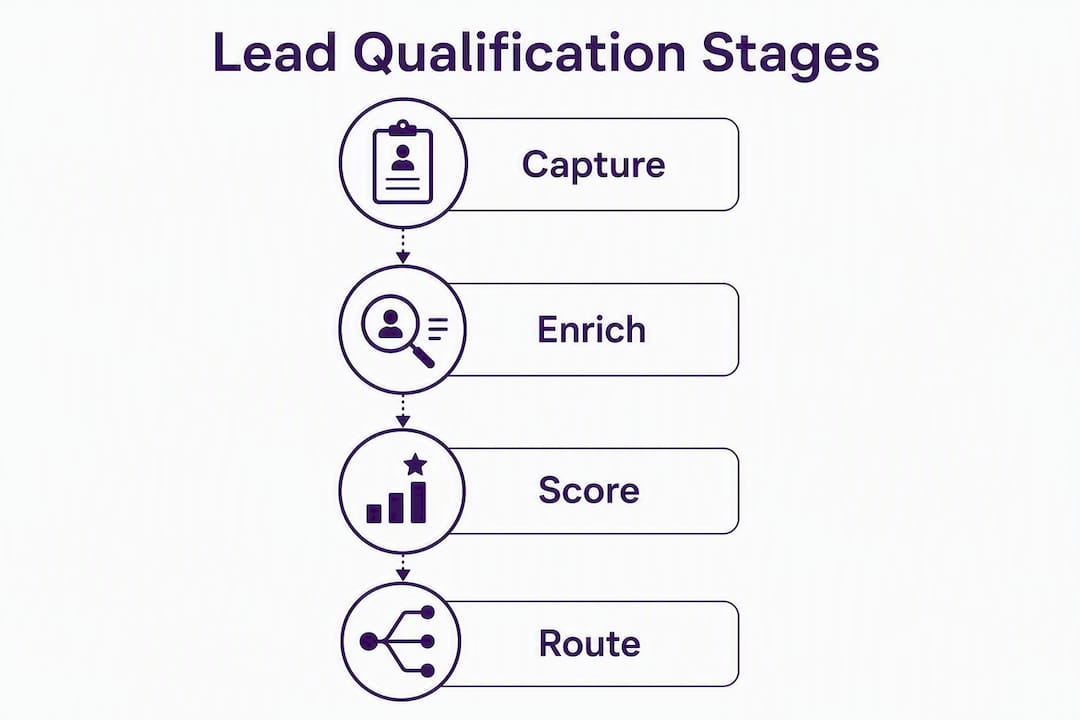
Route sends the qualified lead to the right person or next action: a booking link, a CRM deal creation, an SMS alert to the tradie, or a call transfer. A feedback loop closes the cycle by feeding closed-won data back into the model so scoring weights stay accurate over time.
Pro Tip: Set up your feedback loop before you go live, not after. Even a simple weekly export of closed-won deals into your scoring model will prevent score drift within the first 90 days.
What qualification questions and scoring templates should you use?
A practical phone or chat qualification script for a trade or service business follows this pattern:
- Opening: “Hi, this is Hayley from [Business Name]. I can help you get a quote sorted. Can I grab a couple of quick details?”
- Fit questions: What type of work do you need? Where is the property located? Is this residential or commercial?
- Timing: When are you looking to get this done?
- Budget signal: Do you have a rough budget in mind, or would you like us to provide an estimate?
- Authority: Are you the property owner, or are you organising this on someone’s behalf?
- Close to book: “Great. I can lock in a time for [Tradie Name] to call you back. Does [time slot] work?”
For scoring, a simple weighted model works well for most SMBs. The table below shows a starter template.
| Criterion | Fit points | Engagement points | Threshold action |
|---|---|---|---|
| Service matches ICP | +20 | — | — |
| Location in service area | +20 | — | — |
| Timeline under 2 weeks | +15 | — | Route to priority queue |
| Budget confirmed | +15 | — | — |
| Answered 4+ questions | — | +20 | — |
| Booked callback | — | — | Create CRM deal |
| Score 70 | — | — | Immediate SMS alert |
| Score 40–50 | — | — | Add to nurture sequence |
| Score under 40 | — | — | Hold for review |
HubSpot’s AI-assisted lead scoring supports separate fit and engagement scoring, configurable score limits, negative point values, and score decay for inactive leads. Score decay is worth configuring: a lead who enquired six weeks ago and never responded should not sit at the same score as a fresh inbound.
For inbound leads, weight behavioural signals more heavily. For outbound prospecting, firmographic fit and intent signals carry more weight. Running separate scoring models or weight adjustments per motion gives you cleaner results than a single blended model.
Pro Tip: After your first 30 days live, pull your closed-won leads and check where their scores sat at the time of routing. If most winners scored below your threshold, lower it. If most losers scored above it, raise it. One calibration session beats months of mis-routing.
How do you choose and deploy an AI qualification vendor in Australia?
Vendor evaluation checklist
Before you commit to a platform, confirm each of these:
- Response time SLA: does the vendor guarantee sub-60-second first response on voice and chat?
- CRM integrations: native connectors for HubSpot, Salesforce, Dynamics 365, Pipedrive, and Zoho, with documented sync behaviour (real-time vs daily refresh).
- Routing features: can the system send SMS alerts, create CRM deals, book calendar slots, and escalate to a human in one workflow?
- Reporting: lead response time, qualified lead rate, conversion rate, and cost per qualified lead must all be visible in the dashboard.
- Security and compliance: Australian data residency or clear data-handling documentation, consent management for calls and SMS, and Spam Act alignment.
Questions to ask every vendor
- Which CRM connectors are native versus third-party (Zapier/Make), and what is the sync cadence for each?
- What is the documented SLA for voice response time and chatbot first reply?
- Can I see a live demo with test data from a trade or service business?
- How does your scoring model handle score decay and inactive leads?
- What does onboarding look like, and what metrics should I expect after 30 days?
- Where is customer data stored, and how do you handle consent for outbound SMS and calls under the Australian Spam Act?
Red flags to watch for
- No Australian privacy or data-residency guidance in their documentation.
- Opaque scoring logic with no explanation of which factors drive a score.
- No demo environment or test data available before you sign.
- No clear onboarding plan or defined pilot milestones.
- Promises of “real-time” scoring without disclosing platform recalculation limits (for example, Dynamics 365 refreshes updated leads only after 24 hours).
Deployment timeline
| Phase | Weeks | Key milestones |
|---|---|---|
| Pilot setup | 1–2 | Connect CRM, configure question set, set routing rules |
| Live routing | 3–4 | Go live on one channel (phone or chat), track speed-to-lead daily |
| Calibration | 5–6 | Review closed-won data, adjust score thresholds, fix enrichment gaps |
| Full roll-out | 7 | Activate all channels, automate nurture sequences, set reporting cadence |
On pricing, clarify whether the model is per-lead, subscription, per-minute voice, or pay-per-result. Enrichment and data costs are often separate line items. Get a total cost-per-qualified-lead estimate before you sign, not just the platform fee.
How Ask Hayley handles AI lead qualification for Australian tradies
Ask Hayley is built specifically for the reality of trade work: you are on-site, hands full, and a missed call is a missed job. The platform’s voice-first design means qualification happens through natural conversation, not forms or dashboards.
Core features for lead qualification
- AI phone receptionist: answers inbound calls 24/7, runs a configurable qualification script, and routes confirmed leads via SMS alert or CRM deal creation.
- AI Website Chatbot (add-on): qualifies website visitors in real time, captures contact details, and syncs to your CRM.
- AI Sales Agent (add-on): handles outbound follow-up and re-engagement for leads that did not book on first contact.
- Real-time enrichment: conversational signals from each call or chat session update the lead record immediately.
- CRM sync: integrates with HubSpot, Salesforce, Dynamics 365, Pipedrive, and Zoho, with deal or contact creation triggered by qualification outcomes.
Onboarding and pilot milestones
| Week | What happens |
|---|---|
| 1 | Account setup, CRM connection, question set configured to your trade and service area |
| 2 | Go live on inbound calls; speed-to-lead tracking begins |
| 3–4 | First calibration review; routing rules adjusted based on early lead data |
| 5+ | Full channel coverage active; reporting dashboard live |
Ask Hayley also integrates with Xero for invoicing and AroFlo for job management, so a qualified lead can move from first call to booked job to invoice without leaving the platform ecosystem.
Compliance and privacy
Ask Hayley’s approach to Australian compliance covers consent management for calls and SMS, alignment with the Spam Act obligations administered by the ACMA, and documented data security practices. Full details are available in Ask Hayley’s safety and compliance documentation. For any specific legal or regulatory question, confirm current requirements with a qualified professional or the ACMA directly.
Pro Tip: Configure Hayley’s qualification script to ask for explicit consent to follow up by SMS during the first call. It takes one extra question and keeps every outbound message compliant from the start.
What tradies actually gain
Tradies using AI qualification through Ask Hayley typically see three concrete shifts: fewer missed leads after hours, faster booking because qualified prospects reach the tradie’s calendar directly, and less time spent on admin triage. Industries where this matters most in Australia include electrical, plumbing, solar installation, real estate, legal services, and automotive, where appointment-driven sales cycles and high after-hours enquiry volumes make speed-to-lead decisive.
Key takeaways
AI lead qualification works best when voice, chat, and real-time enrichment combine with a calibrated scoring model and fast CRM routing, measured from day one against speed-to-lead.
| Point | Details |
|---|---|
| Speed-to-lead is decisive | Contact odds drop up to 100x between 5 and 30 minutes; best-in-class is under 60 seconds. |
| Score decay matters | Configure negative points and decay for inactive leads in platforms like HubSpot to keep scoring accurate. |
| Calibrate after 30 days | Pull closed-won data and adjust thresholds; scoring is not a set-and-forget exercise. |
| Track four core metrics | Speed-to-lead, qualified lead rate, conversion rate, and cost per qualified lead. |
| Ask Hayley for tradies | Voice-first AI qualification with CRM sync and 24/7 call answering, built for Australian trade businesses. |
Why voice-first qualification changes the game for tradies
Most AI qualification articles focus on enterprise SDR teams with CRM admins and dedicated RevOps staff. That is not the reality for most Australian trade businesses. You are running a crew, quoting on-site, and your phone is your office. A lead that hits a form and waits for a callback tomorrow is already calling someone else.
The piece of advice most guides skip is this: the channel matters as much as the scoring model. A sophisticated predictive score is worthless if the lead waited 20 minutes for first contact. For tradies and small service businesses, voice-first qualification closes that gap because the AI answers the call immediately, asks the right questions, and routes the outcome without you touching your phone.
There is also a common misconception worth addressing. Many business owners assume AI qualification is only for businesses with hundreds of leads a month. The operational value kicks in much earlier. Even 10 to 15 inbound calls a week, handled consistently and routed correctly, can shift a tradie from scrambling to return calls at 7pm to having a clean, prioritised list of confirmed jobs waiting in their CRM each morning.
See Ask Hayley qualify your leads in a live demo
Missed calls cost Australian tradies real jobs every week. Ask Hayley answers every inbound call, qualifies the lead through natural conversation, and drops a confirmed prospect straight into your CRM, all before you have finished the job you are on.
A 30-day pilot gives you a live qualification script configured to your trade, CRM integration active from week one, and a clear read on your speed-to-lead metric by the end of the month. No long-term lock-in, no extra staff, and no new app to learn.
Book a demo or start your pilot at askhayley.com.au. If you want to see the full plan options first, the Ask Hayley services page has everything laid out.
Useful sources for further reading
These sources cover the benchmarks, CRM documentation, and compliance references cited throughout this article.
- Predictive lead scoring — Microsoft Learn (Dynamics 365) — official documentation on the 0–100 scoring model, real-time scoring behaviour, and the 24-hour refresh constraint for updated leads.
- ACMA: avoid sending spam — the Australian Communications and Media Authority’s guidance on Spam Act obligations for commercial electronic messages, including SMS and email consent requirements.