


A conversational CRM is a customer database you run by talking, calling or messaging instead of typing into forms. The system listens, writes the details down and files them against the right customer or job. For a tradie on a roof or under a sink, that means the enquiry, the quote and the follow-up get recorded without a laptop. Ask Hayley is built this way: you talk to Hayley, and Hayley answers calls you can’t take, pre-qualifies leads and handles admin through voice prompts.
TL;DR
- A conversational CRM captures customer details from calls, chats and messages as they happen, so you don’t enter them by hand later.
- A traditional CRM depends on someone sitting down and typing. Most tradies never get to it, so the data goes stale.
- The biggest win for a trade business is the missed call: a lead that is answered, sorted and logged instead of lost to voicemail.
- Before you switch anything on, check how it handles urgent calls, handover to a human, call recording and the tools you already use.
- Ask Hayley is a voice-first platform for Australian tradies that answers calls, pre-qualifies leads and runs admin by voice.
Table of Contents
- What conversational CRM means
- How it differs from a traditional CRM
- Why it suits trade businesses
- What it looks like in a real business
- What a conversational CRM should handle for you
- How to check one before you rely on it
- Measuring whether it is working
- Where Ask Hayley fits
- Getting started
- FAQ
- Sources
What conversational CRM means
CRM stands for customer relationship management. In plain terms, it is the place where you keep who your customers are, what they asked for, what you quoted and what happens next.
Most CRMs are a database with a screen. You open the app, find the customer, type the notes, set a reminder. The “conversational” part changes how information gets in. The system takes part in the conversation itself, or listens to it, and turns what was said into records.
That can look like several things:
- An AI that answers a phone call, asks the right questions and creates a lead.
- A chatbot on your website that collects the job details and books a time.
- A voice assistant you talk to after a job: “Log a quote for the Hendersons, $4,800, follow up Thursday.”
- Text or messaging threads that sit against the customer record rather than in your personal phone.
You may also see it called chat-based CRM. The idea is the same: the conversation is the interface, and the record builds itself from it.
How it differs from a traditional CRM
The difference is when and how the data goes in. In a traditional CRM, a person enters it after the conversation. In a conversational one, it is captured during the conversation.
| Traditional CRM | Conversational CRM | |
|---|---|---|
| How data gets in | You type it, usually later | Captured from the call, chat or voice prompt |
| Where you use it | Desktop or app with forms | Phone, voice, messages |
| Missed calls | Show as a number in your call log | Answered, sorted and logged |
| Follow-ups | You remember to set them | Prompted or scheduled from the conversation |
| Best for | Office-based sales teams | People who are on site all day |
The table shows why the label matters for trades. A sales team in an office has time to enter notes. A sparky in a ceiling cavity does not. The traditional model quietly assumes a desk, and most trade businesses don’t have one in the middle of the day.
Why it suits trade businesses
Trade work has a particular shape. Your hands are busy, your phone rings at the worst moment, and the customer who can’t reach you usually rings the next name on the list. Admin gets pushed to the evening, when you are tired and the details are fuzzy.
A conversational approach fits that shape in three ways.
Calls get answered
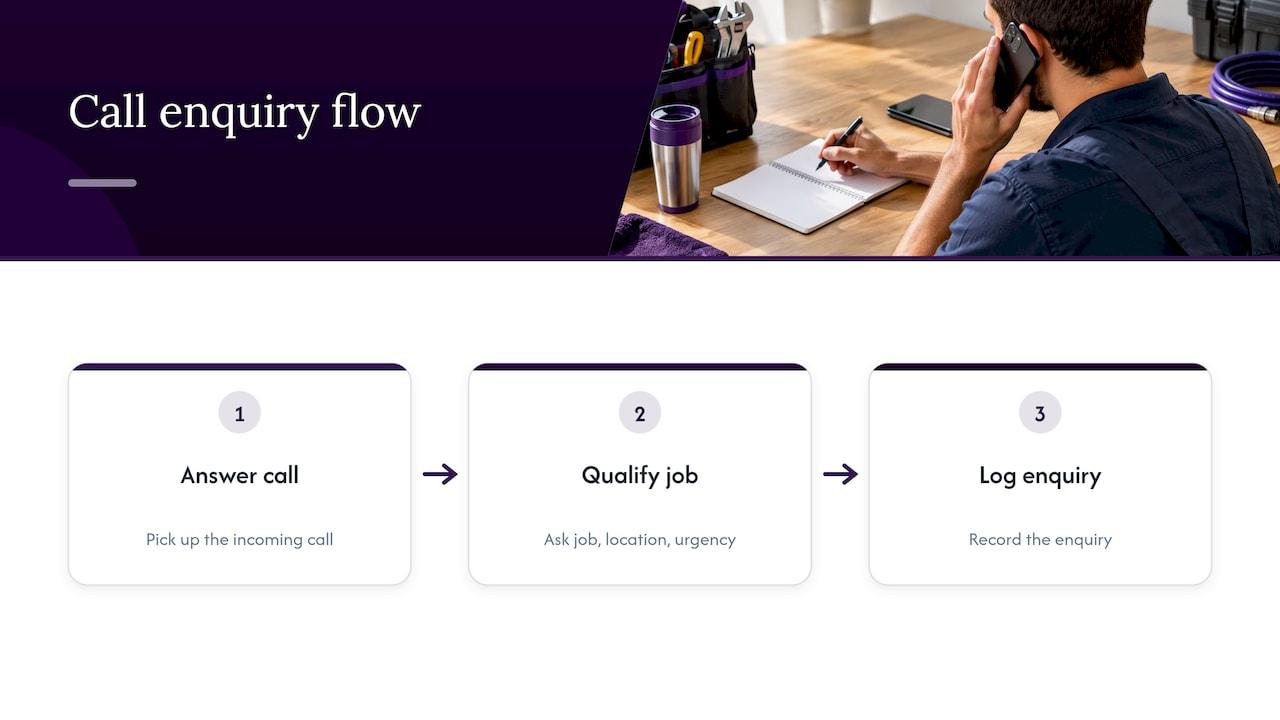
The first place a trade business loses money is the unanswered call. A conversational system picks up, asks what the job is, where it is and how urgent it is, then logs it. Our guide to AI call triage for Australian tradies walks through how that sorting works in practice, and AI receptionist versus a human covers what each option suits.
Leads arrive already sorted
Not every enquiry is a job. Some are price shoppers, some are outside your area, some want something you don’t do. Pre-qualifying means asking a few short questions before the lead reaches your inbox, so you see the real ones first. The lead prequalification questions page lists what is worth asking.
Admin happens where the work is
If you can dictate a quote from the driveway, it goes out the same day, not on Sunday night. That is the point of voice-to-quote: the job details are fresh when you describe them.
What it looks like in a real business
The idea is not limited to tradies, and Australian examples show the pattern. A Melbourne mortgage broker used an AI assistant built into his CRM that contacted existing clients and leads by SMS, held conversations and booked appointments straight into his calendar. He reported refinancing more than $20 million in loans.
At the large end, ANZ put an AI layer into its CRM for business banking in February 2026. According to The Paypers, the system pulls data from 20 separate platforms into one dashboard, and ANZ estimates it will save bankers about a working month a year in data gathering.
A broker and a bank are not a plumber. But both examples show the same shift: the software does the capturing and the booking, and the person does the relationship and the judgement. For a small trade business, the scale is smaller and the gain is simpler. You stop losing leads in the gap between the phone ringing and you getting to a screen.
What a conversational CRM should handle for you
For a trade business, a useful system covers a short list of jobs.
- Inbound calls. Answer, ask the right questions, tell a burst pipe from a quote request.
- Website enquiries. Capture details from a chat or form and respond quickly.
- Lead records. Create or update the customer, job and contact details without retyping.
- Quotes and invoices. Turn what you say into a document you can send.
- Scheduling. Put the job in the calendar and handle changes.
- Follow-up. Remind you, or the customer, at the right moment. Our follow-up cadence guide covers timing.
- Job tracking. Keep a clear trail from enquiry to completion. See work order tracking.
If a tool does only one of these, you still end up with a patchwork of apps. The value of a conversational CRM is that these live in one place and share the same customer record.
How to check one before you rely on it
An AI that talks to your customers is speaking in your name. A few checks are worth making before you let it loose on real callers.
Run realistic test calls
Ring it yourself and have a mate ring it. Try the awkward ones: a customer with a heavy accent, someone who rambles, a call from a noisy site. Ask for a quote, ask for a price on something you don’t do, and check the record it creates.
Decide what it may say
Set limits. It should be able to take details, say when you will call back and book standard jobs. It should not promise prices, warranties or arrival times you haven’t approved.
Make sure urgent calls reach a person
Gas smells, sparking, flooding, a tree on a house: these need a human fast. Check that the system recognises urgent language and has a clear route to you or your on-call person. Try the plain requests a stressed caller would make, such as asking for a person or saying it is urgent.
Check what happens with recordings and personal details
If calls are recorded or transcribed, callers should be told. Rules on recording differ between states and territories, so confirm the position for where you operate, and check where the data is stored and who can see it. This is worth doing before you go live, not after a complaint.
Confirm every booking action
Watch the first few weeks of bookings closely. Check dates, addresses and job types against what the customer actually said, and fix any pattern of errors early.
Check it connects to the tools you use
A conversational CRM that can’t pass data to your accounting or job software just creates a second place to type. Ask how it works with your existing tools. Ask Hayley integrates with Xero, for example, so invoicing doesn’t become double handling.
Have a backup
Phone systems fail, and so do internet connections. Know where calls go if the AI is unavailable, and keep a simple fallback such as forwarding to your mobile.
If you are weighing the whole idea, our note on voice CRM updates tradies should check covers changes to review as the year ends.
Measuring whether it is working
A new system is only worth keeping if the numbers move. Track a few simple things for the first couple of months:
- Calls answered versus calls missed.
- Enquiries that turned into booked quotes.
- Quotes sent within 24 hours of the site visit.
- Hours you spend on admin each week.
The field service KPIs and utilisation rate calculation pages show how to put numbers on the time you get back.
Where Ask Hayley fits
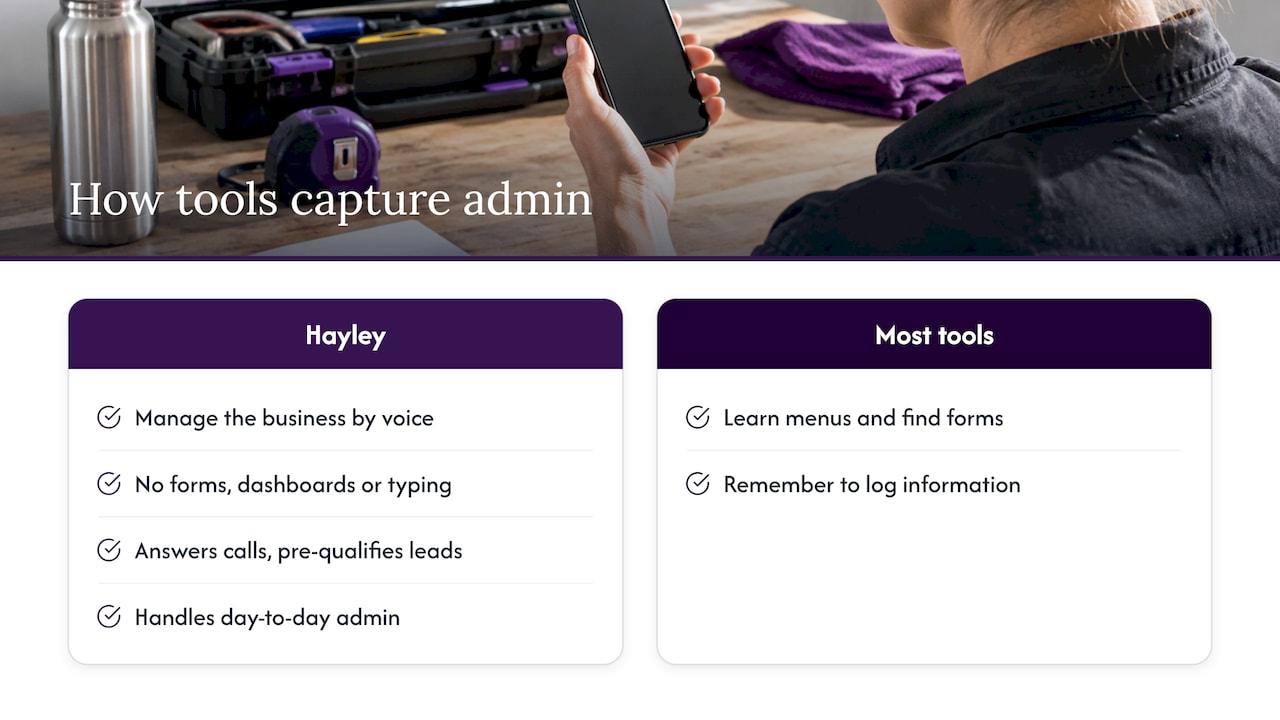
Ask Hayley is a voice-first, AI-powered business management platform made for Australian tradies and small service businesses. You manage the business by talking, with no forms, dashboards or typing. Hayley answers inbound calls when you can’t, pre-qualifies leads before they land in your inbox, and handles day-to-day admin through natural voice prompts.
The features cover lead capture, call answering, quote generation, invoicing, task management, calendar, compliance tracking and reporting, with integrations including Xero. There are two core plans, Assistant and Office Manager, and optional add-ons: an AI Sales Agent and an AI Website Chatbot, for wider coverage of calls, leads and customer enquiries.
If you also need to look professional to win work, we build a one page website, prepare tender documents and write safety and compliance documentation.
Our view
We built Hayley because the tradies we talk to don’t have an admin problem so much as a hands problem. Your hands are full, so the software has to work by voice.
Most business tools ask you to adapt to them: learn the menus, find the right form, remember to log it. We think that is backwards for trade work. The tool should sit in the conversation, take the details and put them where they belong, so you can get on with the job.
That is why we put call answering, lead pre-qualification and day-to-day admin in one voice-first platform rather than one more app. A missed call and a forgotten quote are the same problem: something that was said never got written down. Fix that and most of the rest follows.
Hayley
Getting started
Start small. Pick the one place you lose the most work, which for most trades is the missed call, and fix that first. Run test calls, set clear limits and make sure urgent jobs reach you. Then add quoting, scheduling and follow-up once the basics are reliable.
If you want to see how Hayley would handle your calls and admin, have a look at Ask Hayley and see which plan fits your business.
FAQ
What is a conversational CRM?
It is a customer management system where the conversation is the interface. Calls, chats and voice prompts are captured and turned into customer, lead and job records automatically. You spend less time typing and more time on the tools.
Is chat-based CRM the same thing?
Mostly, yes. Chat-based CRM usually means customers message or chat with your business and the conversation is saved against their record. Conversational CRM is the wider term and also covers voice calls and voice commands from you.
Do I need a conversational CRM if I’m a one-person business?
A sole trader often benefits most, because there is no office staff to catch calls or do the paperwork. If you are on site most of the day, an assistant that answers calls and logs the details covers a gap you would otherwise carry yourself.
Can it handle urgent calls?
It should be set up to recognise urgent situations and pass them to you or your on-call person straight away. Test this with realistic calls before going live, and keep a backup route in case the system or the internet is down.
Will it work with my accounting software?
That depends on the platform. Ask Hayley integrates with Xero, so quotes and invoices can flow into your accounts without retyping.
Sources
- This Broker let AI do the talking: the results
- ANZ rolls out agentic AI-enabled CRM for business banking in Australia


