


Voice job scheduling means you talk and the job lands in your diary. You say who the customer is, where the job is, what needs doing and when, and the booking is captured without a keyboard, a form or a night at the kitchen table. For tradies with wet hands, a ute full of gear and a phone that keeps ringing, it is the most practical way to stop jobs slipping through the cracks.
This guide covers what you can schedule by voice, what to say, how to handle travel time and cancellations, and how to keep customer details safe. It’s written for Australian trade and small service businesses, from sparkies and plumbers to arborists, roofers and concretors.
TL;DR
- Voice scheduling is a way of entering and changing jobs by talking, so your diary stays current while your hands are busy.
- A good booking by voice captures five things: customer, location, the work, timing and a contact number.
- It works best when it feeds one structured calendar and job list, not a pile of loose notes.
- Use voice only when you’re stopped or legally hands-free, and always check names and addresses before they go out.
- Hayley is built for this: you talk, and she answers calls, qualifies leads and helps with admin.
Table of Contents
- What voice job scheduling actually means for a tradie
- Why voice suits trade work
- How to book a job by voice: the five details to capture
- Availability, travel time and job changes
- From booking to quote to invoice
- Getting voice right on a noisy or busy site
- Where voice needs a quick human check
- Protecting customer information
- A simple one-week plan to get started
- Answering the phone is part of scheduling
- Get more from your voice setup
- FAQ
- Sources
What voice job scheduling actually means for a tradie
Most scheduling tools ask you to type. That works at a desk. It doesn’t work when you’re up a ladder, under a sink or halfway through a pour. Voice scheduling swaps the typing for speech.
In practice it covers a few different jobs:
- Creating a booking. “Book Dave Nguyen for a hot water system swap at 14 Banksia Street, Thursday at 8.”
- Moving or cancelling one. “Push Thursday’s Nguyen job to Friday morning.”
- Capturing follow-ups. “Remind me to order a 250 litre cylinder before Thursday.”
- Telling customers where you are. Sending an ETA without stopping to type.
- Taking the call in the first place. Inbound calls you can’t answer are the biggest source of unscheduled work.
The key idea is that voice is the way you give instructions, not the place the information lives. The booking still needs a home: a calendar, a job list and a record of what was agreed. If the home is messy, speaking into it just makes the mess grow faster. That’s why we built Ask Hayley as one voice-first system rather than a voice add-on bolted onto a pile of other apps.
Why voice suits trade work
Trade work has a built-in scheduling problem. The moments you learn about new jobs (a call while you’re on a roof, a text while you’re driving, a chat with a customer at the end of a job) are the moments you can’t sit at a screen. By the time you get home, you’ve forgotten half of it.
Voice fixes the timing. You capture the detail the second you have it, in your own words, and move on. For a small crew that has no office admin, that can be the difference between a diary you trust and one you have to rebuild every Sunday night.
The best times of day to use voice tend to be:
- Between jobs, when you’re driving and your phone is set up hands-free.
- Straight after finishing a job, while the follow-ups, parts and callbacks are fresh.
- A five-minute wrap at the end of the day for tomorrow’s jobs, materials to order and anything still to be scheduled.
How to book a job by voice: the five details to capture
A booking that only says “Dave, Thursday” will cause a headache on Wednesday night. When you speak a job into your diary, work through the same five details every time. Once it’s a habit, it takes about ten seconds.
1. Customer
Give the full name and, for businesses, the company. Spell unusual surnames the first time. Say the mobile number as digits, in groups.
2. Location
Say the street number, street and suburb. Australian place names are where speech tools trip up most, with names like Woolloomooloo, Tuggeranong or Gunnedah often heard as something else. Say the suburb slowly and check the result.
3. The work
One clear sentence: “Replace 250 litre electric hot water system, access via side gate, old unit to be removed.” Add anything that affects the quote or the van: access, height, materials, whether the customer will be home.
4. Timing
Give the day, start time and how long you expect it to take. “Thursday 8 am, half a day” blocks the right amount of diary. If the job is flexible, say so: “Any morning next week.”
5. Anything the next person needs to know
Dogs, gate codes, strata approvals, a customer who wants a text before you arrive. These are the notes that make you look organised.
A full spoken booking might sound like this:
“New job. Sarah Kowalski, 0400 000 000. 22 Wattle Avenue, Mitcham. Replace two ceiling fans in the lounge and main bedroom. Customer supplies the fans. Friday the 14th, 9 am, about three hours. Text her when I’m 20 minutes away.”
That’s customer, location, work, timing and a note, in one breath.
Availability, travel time and job changes
The booking is the easy part. The harder part is fitting it around everything else. A good voice scheduling habit handles four situations.
Checking availability before you promise a time
Ask your diary before you commit: “What does Thursday look like?” That one question stops double-bookings. If your calendar is already a mix of personal appointments, supplier pick-ups and jobs, pull it into one place. Our guide to one work calendar for tradies shows how to cut clashes by keeping everything in a single view.
Building in travel time
Two jobs 40 minutes apart can’t be booked back to back. Make it a rule to say the travel buffer out loud when you book: “Add 30 minutes travel before and after.” Many tradies also leave a flat buffer between jobs for jobs that run over, which they always do.
Moving jobs when things change
Rain, a part that hasn’t arrived, a job that blows out: reschedules are daily life. Say what moved and why: “Move the Mitcham job to Monday 8 am, waiting on parts.” The reason is useful later when a customer asks what happened.
Cancellations and customer notifications
Every change needs to reach the customer. A short SMS confirming the new time saves a wasted trip and a grumpy phone call. We cover reminder timing and wording in our piece on SMS appointment reminders. When a customer cancels, record it as a cancellation (not just a deleted entry) so you can follow up and offer another time later. A steady follow-up cadence turns a lot of cancelled jobs back into booked ones.
From booking to quote to invoice
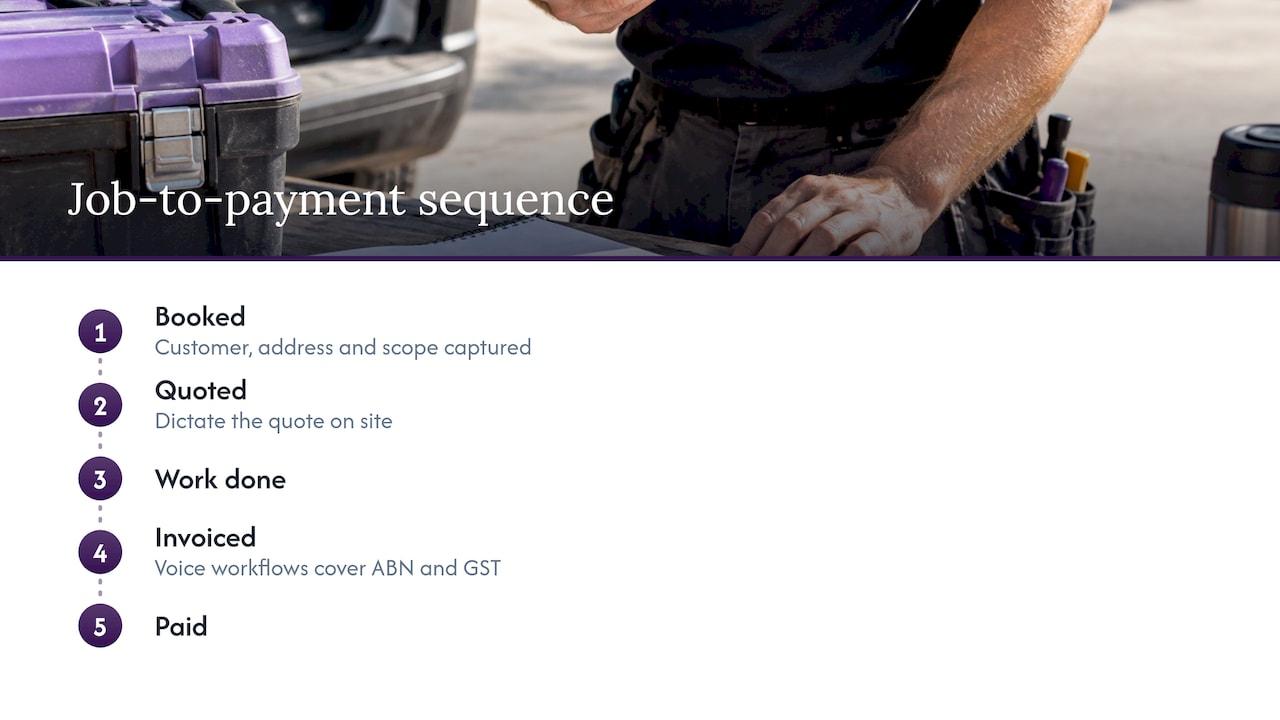
Scheduling is one link in a chain. A job gets booked, quoted, done, invoiced and paid, and every handover is a place where details get lost. If your booking already has the customer, address and scope, the next steps are much faster.
On site, you can dictate the quote while the details are in front of you. Our walkthrough on dictating a voice quote on site covers the ATO-ready details. After the work, voice to invoice workflows cover ABN and GST. To keep jobs moving between stages, see work order tracking. Ask Hayley integrates with Xero and AroFlo, so invoicing and bookkeeping don’t need to be re-entered.
Getting voice right on a noisy or busy site
Voice works best when you give it a fair chance. A few habits make a big difference.
- Step away from the noise. Angle grinders, compressors and chainsaws drown out speech. Walk to the ute, close the door, then speak.
- Speak in short, complete sentences. One thought at a time beats a long ramble.
- Say names and suburbs slowly. Spell uncommon surnames once.
- Read back what matters. Check the date, time and address before you move on. A thirty-second glance saves a wasted trip.
- Use the same phrasing each time. A fixed order (customer, address, work, time, notes) helps both you and the tool.
- Keep your hands and eyes on the task. Voice is for when you’re stopped or when it’s safe and legal.
Driving: know the rules
Voice is handy between jobs, but road rules come first. In NSW, for example, full licence holders may use a phone only if it’s in a cradle or connected by Bluetooth, and learner and provisional drivers can’t use a phone at all while driving, even hands-free, according to NSW Centre for Road Safety. Rules differ between states and territories, so check your own state’s road authority. If in doubt, pull over, or save the dictation for when you’ve stopped.
Where voice needs a quick human check
Voice is fast, not psychic. Some situations deserve a second look before you rely on the booking:
- Unusual place names and surnames. These are the most common errors.
- Heavy accents, fast speech or background noise. Re-record rather than guess.
- Big or complicated jobs. Multi-day builds, anything with strata or council approvals, and jobs with several trades deserve a proper look at the whole schedule.
- Anything legally significant. Quotes, variations and safety documents should be read before they’re sent.
- Customer messages. Read them before they go out, especially names and addresses.
This isn’t about distrusting the tool. It’s about building a quick review step into your routine, like checking your measurements before you cut.
Protecting customer information
A voice booking holds a name, phone number and address. That’s personal information, and you should handle it with care whatever the size of your business.
The Privacy Act 1988 doesn’t cover every small business. According to the Office of the Australian Information Commissioner, a small business is one with annual turnover of $3 million or less, and most are not covered, though some are, such as health service providers, businesses trading in personal information and contractors under a Commonwealth contract. If you hold a Commonwealth contract, for instance on government maintenance work, check the OAIC’s guidance for your obligations.
Even if the Act doesn’t apply to you, good habits are worth having:
- Collect only what you need to do the job.
- Tell customers why you’re taking their details, particularly if calls are answered or recorded by an assistant.
- Use the information for the job, not for unrelated marketing.
- Keep it in one secure, password-protected place, not scattered across personal notes and message threads.
- Be ready to correct or delete details if a customer asks.
Recording laws also vary by state and territory, so if calls are recorded, say so at the start of the call.
Our view: the diary should run itself from your voice
We built Ask Hayley because we kept hearing the same story from tradies: the work is fine, the admin is the problem. Missed calls become lost jobs. Notes scribbled on the back of a hand never make it into the diary.
Our view is that you shouldn’t have to learn another app to fix that. Ask Hayley is designed to be voice-first, so you talk and she handles the rest. She answers inbound calls when you can’t, pre-qualifies leads before they reach your inbox, and takes care of day-to-day admin through natural voice prompts.
We think scheduling works best when it sits in one place alongside calls, quotes, invoices, tasks and compliance, so a job booked by voice flows through to the rest of the business. That’s what we designed Ask Hayley to do.
Hayley
A simple one-week plan to get started
You don’t need to change everything at once. Try this over a week.
- Day 1: Pick one place for every job to live. If it’s currently a whiteboard, a notes app and a calendar, merge them.
- Day 2: Write your five-detail booking script on a card in the ute.
- Days 3 to 4: Book every new job by voice, and read each one back.
- Day 5: Add a travel buffer rule and a reschedule phrase.
- Days 6 to 7: Do a five-minute voice wrap at the end of the day: tomorrow’s jobs, materials, follow-ups.
By the end of the week, you’ll know which phrases you use most. Keep those. For more ways to cut paperwork, see how to automate admin for tradies.
Answering the phone is part of scheduling
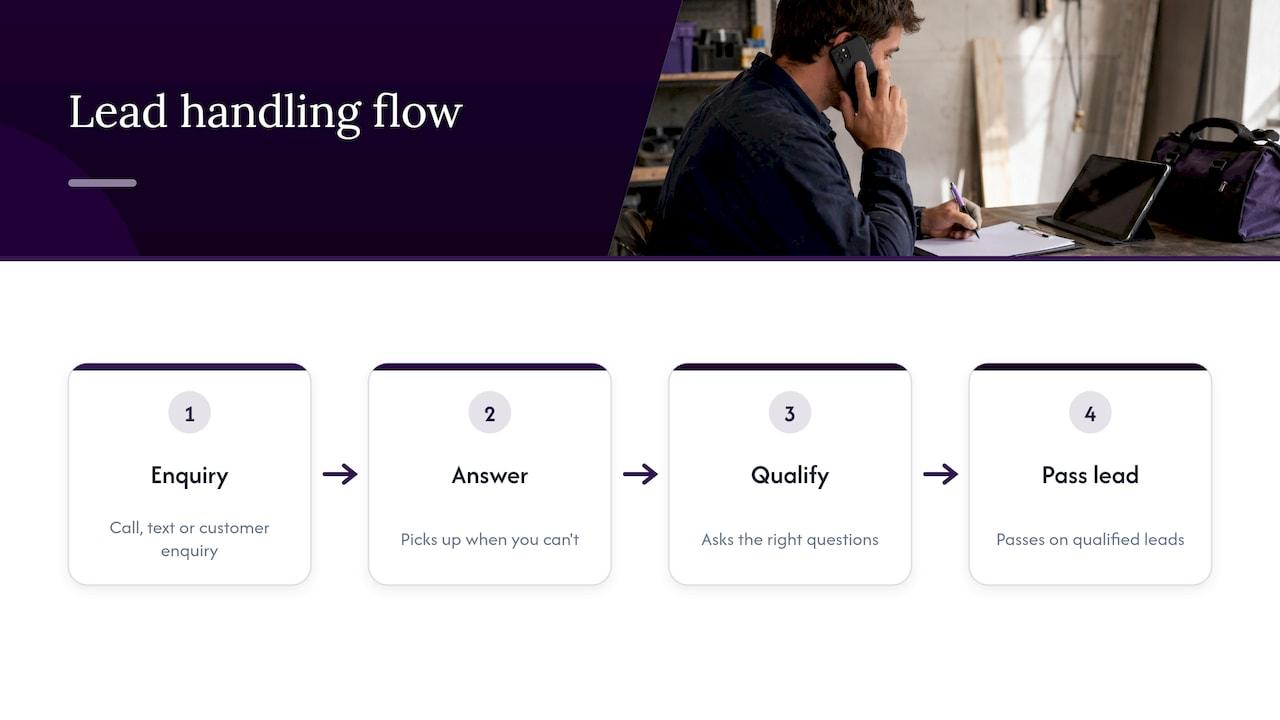
Every booking starts with a call, a text or an enquiry. If you miss it, the customer rings the next tradie on the list. Voice scheduling that only helps you after you’ve picked up the phone solves half the problem.
That’s why call answering sits at the centre of Ask Hayley. She picks up when you can’t, asks the right questions and passes on qualified leads, so you spend your time on jobs that fit your trade, your area and your diary. Two plans are available, Assistant and Office Manager, with optional add-ons including an AI Sales Agent and an AI Website Chatbot if you want broader coverage across calls, leads and customer enquiries.
Get more from your voice setup
If you want to win more work as well as organise it, we also help with the parts of the business customers see before they call. Ask Hayley offers a One Page Website, tender preparation and safety and compliance documentation for Australian trade businesses. Pricing for these is by project, so get in touch through our site to talk through what you need.

If you’d rather start with the daily grind, begin with the diary and the missed calls. Those two fixes tend to give tradies their evenings back.
FAQ
Can I really schedule jobs by talking?
Yes. You say the customer, address, work and timing, and the job is captured without typing. It works best when the booking goes into one structured calendar and job list, and when you read back names, addresses and times before relying on them.
Is voice scheduling safe to use while driving?
Only if it’s legal and hands-free. In NSW, for example, full licence holders can use a phone in a cradle or via Bluetooth, while learner and provisional drivers can’t use a phone at all. Rules vary by state, so check your road authority, and pull over if you’re unsure.
What if my diary is already a mess?
Start by choosing one place for all jobs and moving current bookings into it. Voice makes entry faster, but a single clear calendar is what keeps you organised. Our guide to a single work calendar is a good first step.
Do I need to worry about privacy when customers’ details are spoken into a system?
It’s worth treating seriously. Many small businesses with turnover of $3 million or less aren’t covered by the Privacy Act, but some are, as the OAIC explains. Either way, collect only what you need, tell customers why, store it securely and correct it on request.
Does voice scheduling work for every trade?
The five-detail booking approach suits any trade, from electricians and plumbers to arborists, cleaners, pool builders and removalists. Longer or more complex jobs just need a closer review of the schedule and the scope.
Sources
- Small business, Office of the Australian Information Commissioner
- Mobile phones, NSW Centre for Road Safety


