


The best IVR for a tradie is short, says the option before the number, and always gives the caller a way to reach a real person or leave a proper message. If nobody can pick up because you’re up a ladder or under a sink, the menu is only as good as what sits behind each button. Ask Hayley answers inbound calls when you can’t and pre-qualifies leads before they land in your inbox, so the caller deals with a conversation, not a maze.
This guide covers how to build a menu that doesn’t cost you jobs, with script examples you can adapt for urgent jobs, new enquiries, existing customers and after-hours calls.
TL;DR
- Keep the first menu to three to five options, put the most common caller need first, and say the action before the number.
- Every level needs an exit to a person or a message, and an urgent option only works if someone is actually behind it.
- Keep the greeting short. Write it out, read it aloud, and cut anything a stressed caller doesn’t need.
- Call your own number from a mobile, test after-hours and public holidays, and review the menu regularly.
- For a one-to-five person crew, a call answered by a voice that understands the job often beats any menu. That is what Ask Hayley does.
Table of Contents
- What an IVR is and what it should do for your callers
- Menu design rules that hold up
- IVR script examples for tradies
- Setting up the urgent, new and existing split
- Common IVR mistakes and how to fix them
- How to test your IVR
- Where the menu lives, and what sits behind it
- Let Hayley answer when you can’t
- Our view on IVR for tradies
- FAQ
- Sources
What an IVR is and what it should do for your callers
IVR stands for interactive voice response. It is the automated voice that answers a call, plays a greeting, offers options (“press 1 for…”) and sends the caller to the right place. Genesys describes IVR as technology that defines greetings, prompts, menus and self-service options, works out why someone is calling, and routes them to an agent. A well-designed one gets callers to an available person quickly and is easy to use.
Note the word “agent”. Big call centres have rooms full of them. A tradie business has you, maybe an office person and a couple of crew on site. That changes what good looks like. Your menu has to do three things:
- Tell the caller they’ve reached the right business.
- Sort urgent calls from routine ones.
- Make sure no call ends with nothing: no answer, no message, no next step.
Everything below serves those three jobs.
Menu design rules that hold up
Keep it to three to five options
People on the phone can’t scroll back. Usability research firm Nielsen Norman Group says the preference for concise content on the web carries over to phone trees: callers don’t want ads, promotions or wordy messages standing between them and their task. A tradie caller is usually standing in a flooded laundry or looking at a dead switchboard. They want to be sorted, not sold to.
A good first-level menu for a trade business has no more than four or five choices. If you think you need more, you probably have a sorting problem, not a menu problem. Combine options or push detail to a second level.
Most common option first
Work out why people ring you. For most trades it is a new job or quote, then an existing booking, then an urgent problem, then suppliers or accounts. Put the biggest group first. Look at your call log for a month before you decide.
Say the action, then the number
Say “For a quote on a new job, press 2”, not “Press 2 for a quote”. By the time the caller hears the number, they already know if it applies to them. They only have to remember the number that matters.
Use words your customers use
A homeowner doesn’t know the difference between “service requests” and “call-outs”. Say “leaking tap”, “power’s out” or “new quote”. Avoid internal job codes, department names and trade jargon.
Never trap the caller
Every level needs a way out: press 0 to speak to someone, press 9 to hear the options again, or stay on the line to leave a message. If a caller presses a wrong key, give a short “Sorry, I didn’t catch that” and repeat the options. Don’t disconnect them.
Keep it flat
One level is best. Two is the limit. Three levels of “press 1, then 3, then 2” will send a caller to the next tradie on the search results.
IVR script examples for tradies
The scripts below are starting points. Change the wording to sound like you, and read each one aloud before you record it. If it sounds stiff in your mouth, it will sound stiff on the phone.
Opening greeting and main menu
“G’day, you’ve reached [Business Name], electricians in [area]. If it’s urgent, press 1. For a quote on a new job, press 2. For an existing booking, press 3. To speak to the team, stay on the line.”
That is about 20 seconds when spoken at a natural pace. It answers three questions: have I called the right business, what can I choose, and what if nothing fits. If you want more tested wording for a short greeting, our 20-second phone answering scripts cover several versions.
Urgent option
“If there is danger to life, hang up and call 000. If you have a burst pipe, no power or a gas smell, press 1 now. We’ll get a message to the on-call tech straight away.”
The safety line comes first. A gas leak, a live wire or a fire is a job for emergency services, not a voicemail. Only offer an urgent option when there is a roster and a process behind it. A caller who presses 1 and reaches an unmonitored mailbox is worse off than one who never saw the option.
New enquiries
“Thanks for calling about a new job. After the beep, tell us your name, number, your suburb and what you need done. We’ll call you back today.”
Only promise a callback time you can keep. Asking for suburb and job type up front saves you a wasted call-back for work outside your service area. A set of useful questions is in our guide to lead pre-qualification questions.
Existing customers
“If you’re calling about a booked job, press 3. Give us your name and the address, and we’ll confirm your arrival window.”
After-hours message
“You’ve reached [Business Name]. We’re out on jobs or closed for the day. We’re open again at 7 am tomorrow. If it’s an emergency, press 1. Otherwise leave your name, number and what you need, and we’ll call you back first thing.”
State when you reopen. A caller who hears “we’ll call you back” with no time attached assumes the worst. Our post on voicemail scripts for Australian tradies has six more variations for storms, public holidays and busy periods.
Re-prompt when a key press doesn’t match
“Sorry, I didn’t get that. To hear the options again, press 9. To speak to someone, press 0.”
Setting up the urgent, new and existing split
A simple trade-business menu has a clear logic: urgent, new job, existing job, then a person. It matches the way callers think. A stressed caller needs the urgent option to be unmistakable, so use plain words (“burst pipe”, “no power”) not “priority service”.
Your trade shapes the urgent list:
- Plumbers and gas fitters: burst pipes, no hot water, gas smell.
- Electricians: power loss, sparking, tripping switchboards.
- Roofers and gutter cleaners: storm damage, active leaks.
- Garage door repair, glaziers: a door stuck open or a broken window that leaves the property unsecured.
- HVAC and air con: a unit down in extreme heat, especially for vulnerable occupants.
- Arborists: fallen trees and limbs on a house, a fence or power lines.
If your work is mostly scheduled (painters, tilers, concretors, fencing contractors), you may not need an urgent option at all. Don’t add one just because other menus have it.
Common IVR mistakes and how to fix them
Too many options. Callers forget the choices and give up. Cut to five or fewer.
A long marketing message. Nobody ringing about a blocked drain wants to hear about your 25 years in business. Put that on your website. If your site needs a rewrite, see what to write on a tradie website.
Hidden human access. If the only way to reach a person is to sit through every option, callers hang up. Announce the way to a person early.
Dead ends. A mailbox that is full, a number that rings out, or a disconnect after a wrong key all lose work. Always give a destination.
Outdated information. Wrong opening hours, a staff member who left last year, or a public holiday message that plays in February. Put a review in your diary every six months, and any time your hours, area or team change.
No plan for peak times. If three calls come in while you’re on a job, the fourth caller hears a ring-out. Have an overflow plan. Our page on call overflow for Australian tradies explains how it works.
Recording calls without saying so. If you record, tell callers. We cover wording in the call recording consent script.
How to test your IVR
A menu that sounds fine in your head can fall apart when a real caller uses it. Run through this checklist after setting it up and every time something changes:
- Ring from a mobile that isn’t one of your business numbers.
- Time the greeting. If you’re losing patience, so is the caller.
- Press every option and confirm each lands where you expect.
- Press nothing and see what happens.
- Press a wrong key and check you get a polite re-prompt, not a disconnect.
- Ring after hours, on a weekend and on a public holiday (these differ by state) to hear the right message.
- Ask someone who doesn’t work for you to call and tell you what they found confusing.
Then watch the numbers. Track how many callers hang up in the menu, how many press 0 to escape, how many get sent to the wrong place and how long it takes to reach a human. An analytics guide from Data Science for Managers recommends getting a baseline over at least 30 days and then changing one thing at a time, so you know what made the difference. Genesys also says IVR design involves tradeoffs and ongoing testing and updating as customer behaviour changes.
For a small business, a simple version works: write down the number of missed calls and voicemails each week. If the number of missed calls grows, fix the call handling before you spend more on ads.
Where the menu lives, and what sits behind it
An IVR is set up in your phone system or through your phone provider. If you’re running a Brisbane office with several lines, looking at business phone systems in Brisbane is a reasonable starting point for how auto attendants and call routing fit with the rest of your set-up.
Whatever platform you use, the menu is only half the job. Each option must lead to something: a person who answers, a team that rings together, or a message that someone actually checks. For a crew of two to four, ring the whole team at once rather than a single phone that might be in a toolbox.
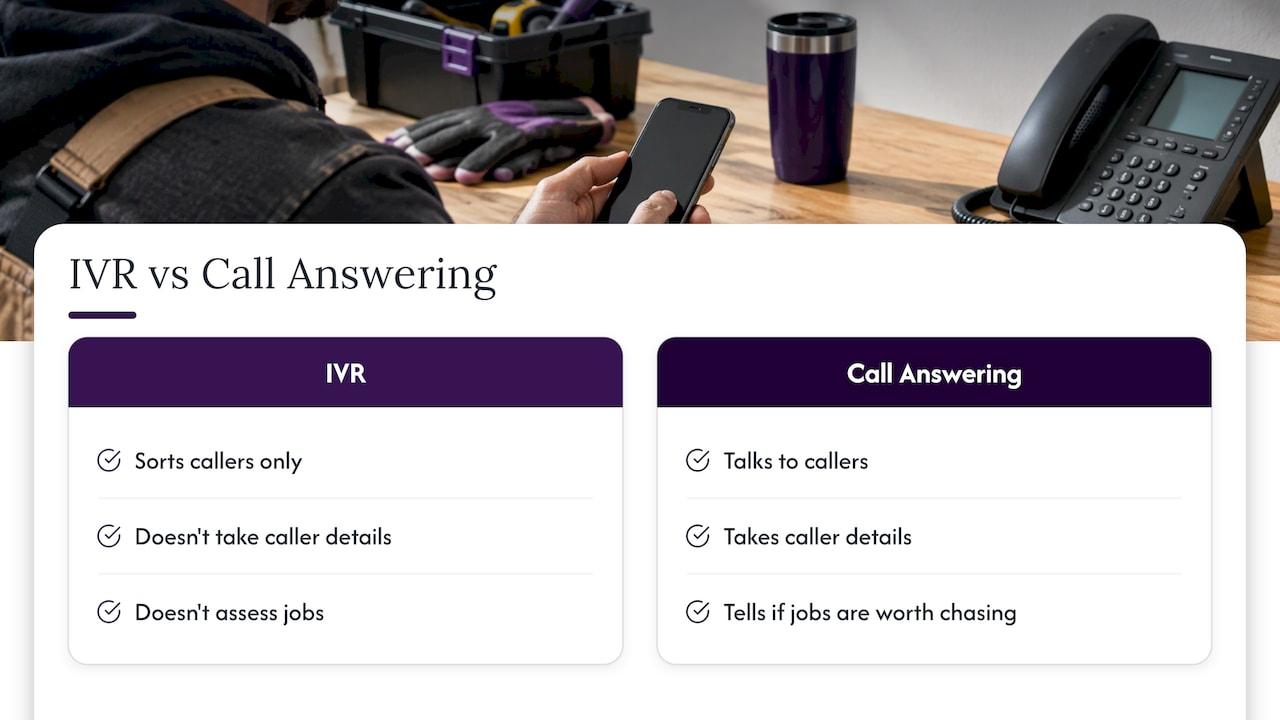
And here’s the honest issue for a trade business. Most of your working day is spent where you can’t answer. A menu sorts callers, but it doesn’t talk to them, take details or tell you if the job is worth chasing. That’s the gap between an IVR and a call-answering assistant. Our comparison of voicemail versus call answering lays out the difference in plain terms, and how AI call triage works shows the process from first ring to your inbox.
Let Hayley answer when you can’t
Ask Hayley is a voice-first business platform built for Australian tradies. Hayley answers inbound calls when you can’t, pre-qualifies leads before they reach your inbox, and handles day-to-day admin through natural voice prompts, with no forms, no dashboards and no extra app to learn. The platform runs on two core plans, Assistant and Office Manager, with optional add-ons including an AI Sales Agent and an AI Website Chatbot for broader coverage across calls, leads and enquiries.
If your phone is your shopfront, see how it works at Ask Hayley.
If you want a clearer picture of how an AI voice compares to a person at the front desk, read AI receptionist vs human.
Our view on IVR for tradies
We built Ask Hayley around one fact: a tradie’s hands are full. You’re on a roof, in a ceiling or halfway through a pour. Typing into a dashboard isn’t an option, and neither is stopping to answer every call.
That’s why we think about IVR differently. A menu is a sorting tool. It helps when you have people to sort callers to. When you’re a small crew, the caller still needs someone to listen, ask about the job and pass it on.
So Hayley answers the call, pre-qualifies the lead and gets the details to you, while you keep working. You talk to Hayley the same way, with natural voice prompts for your admin. We designed it to give you back the time you lose to missed calls and paperwork, without adding another app.
Use the best practices in this article whatever you do. Short, clear, honest about hours and always with a way through. Then make sure someone is on the other end of every call.
Hayley
FAQ
How many options should an IVR menu have?
Keep the first level to three to five options, with the most common reason for calling first. If you need more, use a second level, but keep it flat. For most trade businesses, urgent, new job, existing booking and speak to the team covers nearly every call.
How long should an IVR greeting be?
Short enough that a caller doesn’t lose patience, usually under 20 seconds including the menu. Write the whole script first, say it aloud and cut anything that isn’t about the caller’s task. Leave the business history for your website.
Do I need an IVR if I’m a one-person business?
Not necessarily. With one or two people, the priority is that every call is answered or ends with a proper message and a promised callback. A simple greeting with a call-answering service behind it can serve callers better than a menu. Hayley answers calls when you can’t, so callers deal with a conversation, not a list of numbers.
What should an after-hours IVR message say?
Say you’re closed, give your reopening time, offer an emergency path if you really have one, and invite the caller to leave their name, number and job details. If there’s a risk to life, tell callers to hang up and call 000.
Sources
- Plan for interaction routing design, Genesys Cloud
- The UX of Phone-Tree Systems: 16 Usability Guidelines, Nielsen Norman Group
- Data-Driven IVR Testing, Data Science for Managers


