


A digital job card is the paper docket book moved onto your phone: one record per job that holds the customer, the address, the work, the time, the materials, the photos and the sign-off. For a tradie, the best version is the one you can fill in with dirty hands and no screen time. That is why we think the future of job cards is voice, not forms.
This guide explains what a digital job card is, what it should hold for your trade, how it works from booking to invoice, what to check before you pick a system, and how to stop it becoming one more thing to type into at 7 pm.
TL;DR
- A digital job card is one live record per job: who, where, what, time, materials, photos, approvals and sign-off.
- Its real value is what happens after the job: the details feed the invoice, so nothing gets lost between the ute and the office.
- Capture the same core fields on every job, then add the extras your trade needs (a hazard note for an arborist, a test result for an electrician).
- Choose a system on how fast you can use it on site, whether it connects to Xero, and whether your crew will actually use it.
- If typing is the problem, a voice-first approach removes it: you talk, the admin gets done.
Table of Contents
- What a digital job card is
- What a digital job card should capture
- How a digital job card works, start to finish
- Why the card matters for your margins
- Choosing a digital job card system
- The problem with most job card apps: they still need typing
- Where Ask Hayley fits
- Getting started in a week
- Perspective
- Put the admin on autopilot
- FAQ
- Sources
What a digital job card is
A job card (also called a job sheet or docket) is the record of a single job. On paper, it is the carbon-copy book on the dash, the scribble on the back of a quote, or the text you sent yourself. A digital job card does the same thing on a phone or tablet, and keeps it in one place that the office, or you at home, can see.
The difference from paper is not the screen. It is that the record is:
- Searchable. You can find the Hendersons’ roof job from March without digging through a shoebox.
- Shared. The person who booked the job and the person on the tools see the same thing.
- Connected. Hours, materials and photos can flow into the invoice instead of being retyped.
- Hard to lose. A coffee-stained docket is gone. A saved record is not.
For a sole trader the card is mostly a memory aid and an invoicing shortcut. For a crew of three or more, it is how everyone knows what was promised, what was done and what is still outstanding.
What a digital job card should capture
Keep the core short, or nobody fills it in. These are the fields that matter on almost every job, whatever your trade.
The core fields
- Customer and site: name, phone, email, job address, access notes (dog, gate code, strata contact).
- Scope of work: what you agreed to do, in plain words, matching the quote.
- Schedule: booked date, start and finish times, who is on the job.
- Time: actual hours per person. This is what lets you check whether the job made money.
- Materials: what you used, what came from van stock and what you bought for the job.
- Photos: before, during and after.
- Variations: extra work the customer asked for, and their approval.
- Sign-off: the customer confirming the job is done.
- Status: quoted, booked, in progress, complete, invoiced, paid.
Extras by trade
The core stays the same. The extras change.
| Trade | Useful extras on the card |
|---|---|
| Electricians | Circuit and test notes, certificate of compliance details, switchboard photos |
| Plumbers and gas fitters | Fixture and fitting list, compliance certificate, before and after photos of concealed work |
| Arborists | Hazard notes (powerlines, access), species and tree location, machinery used, disposal |
| Roofers and gutter cleaners | Roof access method, weather delays, photos of damage found |
| HVAC and air con | Unit model and serial, refrigerant used, service history |
| Painters, tilers, carpenters | Colour and product codes, rooms and measurements, variation approvals |
| Pool and irrigation | Equipment on site, chemical readings, zone or schedule notes |
| Cleaners and removalists | Checklist of tasks or inventory, damage notes, access times |
| Concretors and fencers | Measurements, boundary notes, weather, mix or material details |
If your card has a field you never use, delete it. Every extra tap on site is a reason to “do it later”, and later is when details vanish.
How a digital job card works, start to finish
The steps are simple. Where it goes wrong is at the handovers.
1. Create the job
The card starts when an enquiry becomes a booked job. Pull in the customer details and the scope from the quote so you are not typing the same thing twice. If your enquiries arrive by email, our guide to an email to job workflow shows how to turn them into booked jobs.
Where it goes wrong: the scope on the card differs from the quote, and you argue about it on the day.
2. Schedule it
Put the job on the calendar with the right person and a realistic time slot. Our job scheduling practices cover how to do this without sitting at a desk.
Where it goes wrong: the card and the calendar live in two places and drift apart.
3. Update it on site
This is the step that decides whether the system works. On site you need to start and stop the clock, log materials, take photos and note any change to the work. It has to be quick, work when reception drops out, and be usable with gloves on.
Where it goes wrong: the update is left until the end of the day, then done from memory. Hours get rounded, materials get forgotten and money leaks.
4. Get approval and sign-off
If the customer asks for extra work, record it and their okay before you do it. At the end, get them to confirm the job is complete. A saved sign-off is far easier to point to than “he said it was fine”.
5. Turn it into an invoice
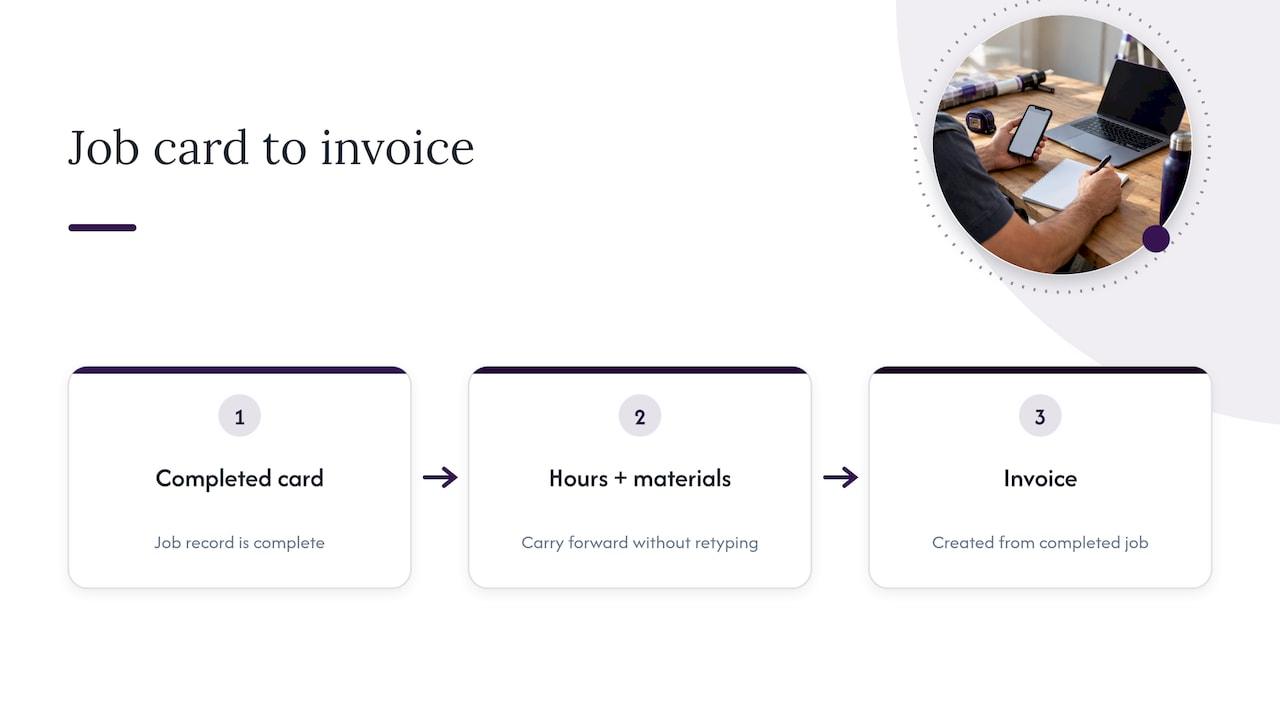
This is the payoff. When the card is complete, the hours and materials should become the invoice, with no retyping. One Australian tradie finance site describes disconnected systems as costing five manual steps per job, and says connecting job management, accounting and payments lets a completed job create its own invoice. Even if your numbers differ, the principle holds: every time you retype, you lose time and invite mistakes.
If you want to see what a clean invoice looks like once the job record is done, a simple invoice generator shows the basic layout. For a full workflow, see our guide to the hands-free quote to invoice workflow.
Why the card matters for your margins
A job card is not paperwork for its own sake. It is the only place where the real cost of a job is written down.
Without recorded hours and materials, you quote the next job on a guess. With them, you can see which jobs paid and which ones didn’t. Three guides on our site build on exactly this data:
- Job costing for tradies shows how to work out what a job really cost.
- Charge-out rates from real job time explains how to set your rate from what your hours actually look like.
- Job profitability analysis shows how to spot jobs that quietly lose money.
A worked example: you quote a bathroom re-tile at 20 hours. The card shows 26, because of a wall that needed re-sheeting. If you only see that on the card, you know the next quote needs a line for hidden prep. If you never recorded it, you just feel tired and a bit underpaid.
Choosing a digital job card system
There are plenty of options, from simple job-sheet apps to full business management platforms. Judge them with these questions.
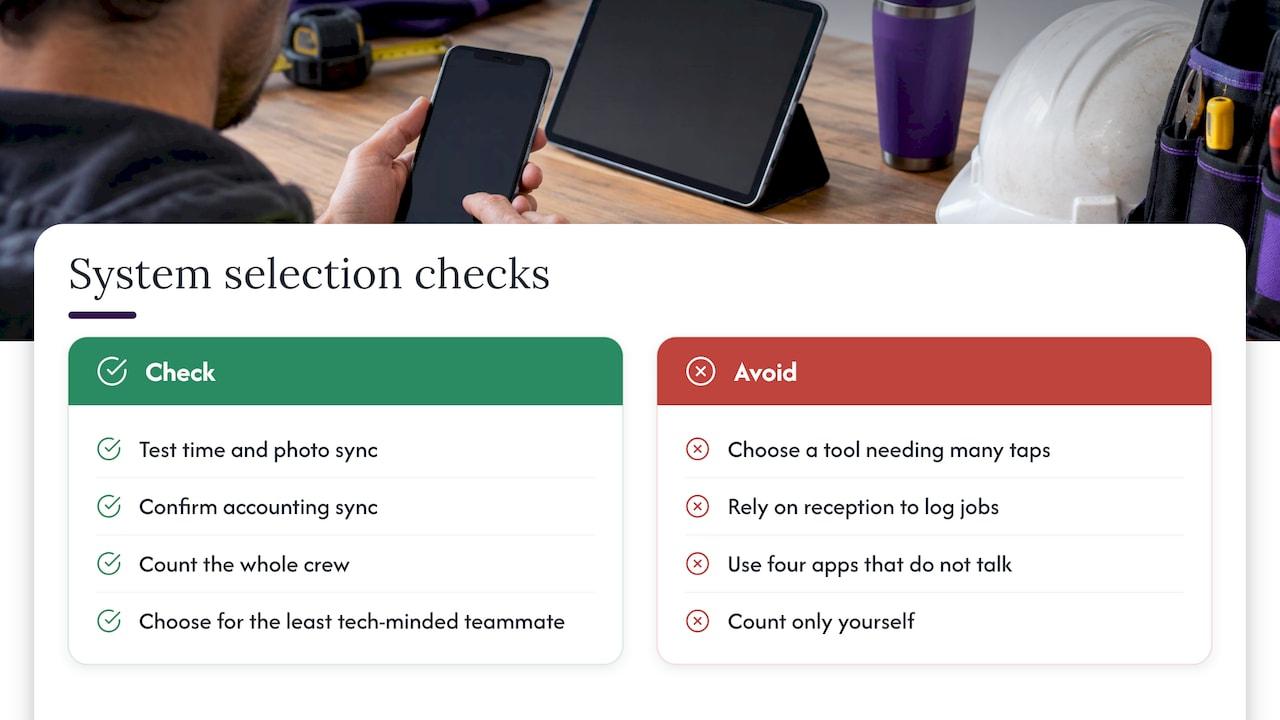
Can you use it with one hand? Big buttons, few screens, quick start and stop. If it takes more than a few taps to log a job, it will not be used.
Does it work with poor reception? Plenty of sites have patchy coverage. Check that you can record time and photos and that they sync later.
Does it connect to your accounting? If you use Xero, the job record should feed invoices without retyping. Ask what actually syncs: customers, invoices, payments.
Does it cover quotes and scheduling too? A job card on its own is one piece. Quote, calendar, job card and invoice in one place beats four apps that do not talk.
Will your crew use it? The best system on paper fails if your apprentice ignores it. Pick the one the least tech-minded person on the team can handle.
What does it cost per person? Many tools charge per user. Count your whole crew, not just yourself.
Can you get your data out? Your job history is an asset. Make sure it is yours.
The problem with most job card apps: they still need typing
Most digital job cards ask you to open an app, find the job, tap through screens and type notes. That is better than paper, but it still assumes you have a free hand and a clean screen.
Tradies do not work like that. You are up a ladder, under a sink, in a roof cavity or on a mower. The admin gets pushed to the end of the day, and that is exactly where job cards fail: late, vague and incomplete.
The fix is not a better form. It is not having to fill in a form at all.
Where Ask Hayley fits
Ask Hayley is a voice-first business management platform built for Australian tradies and small service businesses. Instead of forms and dashboards, you talk to Hayley and she handles the admin. The platform covers lead capture, call answering, quote generation, invoicing, task management, a calendar, compliance tracking and reporting, and it integrates with Xero.
In practice, that means the pieces a job card depends on are in one place:
- A call comes in while you are on the tools. Hayley answers it and pre-qualifies the lead, so the enquiry arrives with the details already captured.
- You dictate the quote on site rather than writing it up that night.
- The job goes onto your calendar and task list.
- When the job is done, you turn the work into an invoice by voice, with ABN and GST handled, and Xero invoice automation helps you stop chasing payments.
If you want a wider view of what can be taken off your plate, read our guide on how to automate admin for tradies.
Getting started in a week
You do not need to switch everything at once. Try this.
- Day 1: Write down the fields you really use on a paper docket. That is your core list.
- Day 2: Add one or two extras for your trade from the table above.
- Days 3 to 5: Use the new card on every job, even the small ones. Habit matters more than perfection.
- Day 6: Compare hours and materials on the card to what you quoted. Note the gaps.
- Day 7: Send one invoice straight from the card data. If it saved you time, keep going. If it didn’t, find the step that slowed you down.
For a crew, start with one person and one job type. Roll it out once it works.
Perspective
Every tradie we speak to has the same problem. The work is not the hard part. The hard part is the admin that follows you home: the missed call, the quote you have not written, the hours you can no longer remember.
A job card should fix that, but too many of them add another screen to a day that has no room for one. So we built Ask Hayley around a different idea. If you can talk, you can run your business. You say what happened, and the paperwork follows.
We designed the platform for Australian tradies and small service businesses, with quotes, invoicing, scheduling, compliance tracking and Xero integration in one place, so the job record does not live in five different apps. Fewer apps, less typing, more time with your family.
Hayley
Put the admin on autopilot
If your job cards, quotes and invoices are scattered across notebooks, texts and a laptop you open on Sunday night, Ask Hayley is built to pull them into one voice-first system. You talk, Hayley handles the call answering, lead pre-qualification and day-to-day admin, and the platform connects with Xero.

See how it works for your trade at Ask Hayley. If you also need a professional face for the business, we build a one page website and prepare tenders and safety and compliance documentation.
FAQ
Is a digital job card the same as a job sheet or docket?
Yes, for most trades they mean the same thing: the record of one job. “Job card” is common in workshops and maintenance, “docket” and “job sheet” are more common on building and service sites. What matters is what the record holds and whether it connects to your invoicing.
Do I need a job card if I am a sole trader?
It helps. Even working alone, you need a record of hours, materials and approvals to invoice accurately and to price your next job. A short card saves you reconstructing the job from memory weeks later.
What should I put on a job card for variations?
Write what changed, the extra time or materials, and the customer’s approval before you start the extra work. Record the approval on the same card as the original scope so everything sits together if there is a dispute later.
Can I use job cards if I am often out of mobile reception?
Yes, but check that the system lets you record time and photos offline and syncs when you are back in range. This is one of the first things to test before you commit your whole crew to a system.
How do job cards link to Xero?
A connected system sends the customer, hours, materials and invoice details across so you are not retyping them. Ask Hayley integrates with Xero, and our guide to Xero invoice automation shows how the workflow runs.


