


Utilisation rate calculation comes down to one formula: billable hours divided by available hours, multiplied by 100. A consultant who bills 30 hours in a 40-hour week is running at a typical utilisation rate used as an example. That number only means something once you label the denominator: are you dividing by gross scheduled hours or net available hours after leave and holidays? Get that wrong and every comparison you make afterwards is skewed.
TL;DR:
- Using net available hours after leave and holidays ensures accurate comparison and prevents skewed utilisation rates across teams or periods.
- Regularly normalising for seasonal dips and regional public holidays prevents false signals of underperformance in utilisation metrics.
- Maintaining consistent categorisation of billable, productive non-billable, and overhead hours across all personnel is crucial for meaningful analysis.
- Combining utilisation data with realisation rates and billing margins provides a clearer picture of profitability and capacity planning.
- Automating time-tracking with dedicated software and voice-first capture reduces data entry errors, improving the reliability of utilisation metrics.
Table of Contents
- How to calculate utilisation rate step by step
- Getting your definitions straight before you calculate anything
- Worked examples you can copy into a spreadsheet
- Setting available hours correctly for Australian teams
- What’s a healthy utilisation rate, and what the extremes signal
- Practical ways to lift utilisation without burning out your team
- How Ask Hayley helps small teams capture time accurately
- Why utilisation moves your bottom line more than most managers realise
- Tools and software for tracking utilisation without the manual spreadsheet grind
- Adapting the formula for different industries and roles
- What actually matters once you’ve done the maths
- Sources
How to calculate utilisation rate step by step
Before you touch a calculator, pick your measurement window. Weekly figures catch short-term dips fast but bounce around too much to guide staffing decisions. Monthly and quarterly windows smooth out that noise and suit budget reviews and capacity planning better. Most consultancies track weekly for operational check-ins and roll up to monthly for reporting.
Once you’ve settled on a window, run through these steps:
- Set your available hours. Start with gross scheduled hours (say, 38 hours a week under a standard award) then subtract public holidays, annual leave, sick leave and any rostered days off to get net available hours.
- Log billable hours. Total the hours a person spent on chargeable client work during the same window.
- Log productive non-billable hours separately, things like internal training, mentoring or proposal writing that add value but aren’t invoiced.
- Apply the right formula for the question you’re asking:
- Billable utilisation = Billable hours ÷ Available hours × 100
- Productive utilisation = (Billable + Productive non-billable) ÷ Available hours × 100
- Capacity utilisation = a team-wide figure, often the average of individual utilisation rates across the group
Each variant answers a different question. Billable utilisation tells you about revenue generation. Productive utilisation tells you how much of a person’s time is genuinely useful, billed or not.
Getting your definitions straight before you calculate anything
Utilisation numbers only mean something when everyone’s using the same rulebook. Consistency in how time is categorised across people and periods is what turns a raw percentage into something you can actually act on. Lock in these categories before you calculate a single hour:
- Billable hours: time spent on chargeable client work, direct delivery, site visits, client meetings.
- Productive non-billable hours: internal training, mentoring junior staff, proposal writing, technical research that doesn’t get invoiced but builds capability.
- Overhead hours: admin, team meetings, timesheets, IT troubleshooting, anything that keeps the business running but isn’t client-facing.
- Available hours: the total hours someone is rostered to work in the period, before any deductions for leave.
For part-time staff, prorate available hours to their contracted days rather than a full-time base. For leave, annual and sick leave should reduce available hours for that period. Long service and parental leave usually get excluded from the calculation entirely rather than counted as zero-utilisation weeks.
Worked examples you can copy into a spreadsheet
Numbers make more sense with a real scenario attached. Here’s an individual example first, then a team roll-up.
- Individual, monthly window: A consultant is rostered for 160 hours in a month (gross). They take one public holiday (8 hours) and two days of annual leave (16 hours), leaving 136 net available hours. They log 102 billable hours and 14 productive non-billable hours. Billable utilisation is 102 ÷ 136 × 100 = 75%. Productive utilisation is (102 + 14) ÷ 136 × 100 = 85.3%.
- Team roll-up, weekly window: A five-person team reports individual billable utilisation rates of 82%, 70%, 91%, 65% and 78%. The team capacity utilisation is the average of those figures, 77.2%, giving a quick departmental snapshot without recalculating from raw hours.
For a spreadsheet, a simple formula works: =Billable_Hours/Available_Hours*100. Build one column for gross scheduled hours, one for leave deductions, one for net available hours, and label the header clearly as “net” or “gross” so nobody misreads the base later. A basic calculator walkthrough follows the same four steps: tally productive hours, tally available hours, divide, then interpret against your benchmark.
Setting available hours correctly for Australian teams
Australian public holidays vary by state, and that’s exactly where utilisation figures start lying to you. A Victorian office closed for the Melbourne Cup will show a dip that a Queensland office won’t, purely because of the calendar, not performance.
- Treat every state public holiday and rostered day off as non-available hours for that reporting period, not as zero-utilisation time.
- For part-time rosters, base available hours on contracted days, not a standard 38-hour week.
- Exclude long-term leave (parental, long service) from the calculation entirely rather than dragging the average down.
- Normalise for seasonal dips, end-of-financial-year admin crunches are predictable and shouldn’t be read as a capacity problem.
Pro Tip: Build a rolling 12-month view alongside your monthly figures. One low month next to eleven solid ones tells a completely different story than a genuine downward trend.
What’s a healthy utilisation rate, and what the extremes signal
Most guidance for professional services places a practical target range around 70 to 80%, though partners and senior client-facing roles often sit lower by design, since business development and oversight eat into billable time.
A rate sitting well under that range for months usually points to a sales gap or overstaffing, not a productivity problem with the team itself.
Utilisation alone doesn’t tell the full story. Pair it with your realisation rate, billed revenue against standard rates, and look at the distribution across the team, not just the average.
Practical ways to lift utilisation without burning out your team
Improving utilisation starts with cleaner data, not harder work. If people are rounding hours or forgetting to log admin time, your baseline is fiction before you’ve even started measuring improvement.
- Tighten time-entry habits: log hours daily, not from memory at the end of the week.
- Smooth demand in the short term by shifting bench time toward proposal work or training rather than leaving it idle.
- Use short-term contractors to absorb demand spikes instead of overloading permanent staff.
- Review pricing and scoping regularly, chronic underutilisation sometimes means your rates or role definitions don’t match the work coming in.
Pro Tip: Watch for metric gaming, staff quietly reclassifying admin time as billable to hit a target. It inflates the number and hides a real capacity problem underneath it.
Training schedules matter here too. Bunching all professional development into one quarter tanks utilisation for that period and inflates it artificially for the rest of the year. Spread it out instead.
How Ask Hayley helps small teams capture time accurately
Most utilisation figures fall apart at the point of data entry, not the formula. If a tradie or field technician forgets to log an hour on-site because they’re covered in dust with both hands full, that gap quietly distorts every report downstream.
Ask Hayley’s voice-first platform is built around exactly that problem. Instead of opening an app and typing, tradies talk to Hayley to log job time, capture leads and update tasks as they happen, cutting the lag between doing the work and recording it. For small service businesses, that means job tracking, progress claims, invoicing and reporting stay linked to what actually happened on-site, with integrations into platforms like Xero feeding cleaner numbers back into your utilisation calculations.
Why utilisation moves your bottom line more than most managers realise
Utilisation isn’t just an HR dashboard metric, it’s a direct lever on gross margin. If your billing rate is fixed and your team’s fixed costs (salaries, rent, insurance) don’t change with output, every percentage point of utilisation above your break-even point flows almost straight to profit.
Run the maths on a simple case: a consultancy with a $150,000 fully-loaded cost per consultant and a $200 hourly billing rate needs roughly 750 billable hours a year just to break even on that person’s cost, before touching overhead or profit margin. Every hour billed past that point is largely margin, which is why a five-point swing in average utilisation across a ten-person team can move annual profit by six figures without a single new client won.
The flip side matters just as much. Consultancies chasing utilisation without watching realisation rate sometimes discover they’re billing plenty of hours at heavily discounted rates, high utilisation, thin margin. Financial performance depends on both numbers moving together, not one propped up while the other quietly erodes. A monthly review that puts utilisation, realisation and average billing rate on the same page catches that mismatch before it shows up in the annual results.
For growing consultancies, utilisation trends also signal when to hire.
Tools and software for tracking utilisation without the manual spreadsheet grind
Spreadsheets work fine for a team of three. Past that, manual tracking becomes its own admin burden, and the data quality drops exactly when you need it most.
Dedicated time-tracking and resource-management platforms (the category includes tools built specifically for professional services scheduling and billing) automate the denominator side of the equation, pulling rostered hours, approved leave and public holidays into available-hours calculations automatically, rather than someone manually adjusting a spreadsheet cell every time someone takes a day off. Practice-management software aimed at consultancies typically bundles time entry with invoicing and project budgets, so utilisation figures sit next to realisation and margin data rather than living in a separate file nobody cross-checks.
For smaller trade and service businesses, the practical barrier isn’t software choice, it’s capture. A platform is only as good as the data going into it, and most utilisation-tracking failures come down to people forgetting to log time, not a missing feature. That’s the gap voice-first capture is designed to close: recording time as work happens rather than relying on someone reconstructing a week from memory on Friday afternoon. Whatever system you land on, check it exports cleanly to your accounting platform, reconciling utilisation data against invoiced revenue manually every month doesn’t scale past a handful of staff. For a broader view of how metrics and reporting fit together operationally, a guide to efficiency metrics for service businesses covers dashboard design worth borrowing from, even outside its original industry.

Adapting the formula for different industries and roles
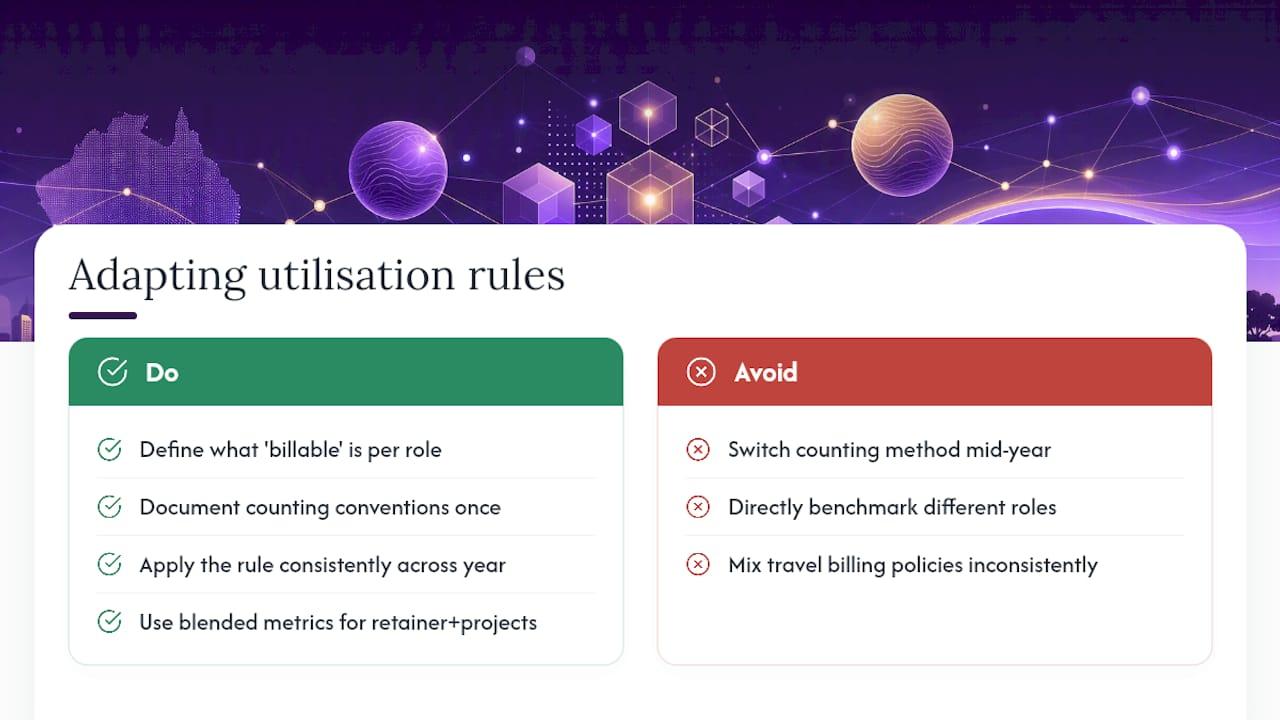
The core formula doesn’t change across industries, billable divided by available, multiplied by 100, but what counts as “billable” and “available” shifts a lot depending on the role.
A management consultant’s billable hours are client-facing strategy work; a lawyer’s might include research time billed in six-minute units. A creative agency often blends retainer hours with project hours, needing a blended utilisation figure that separates the two revenue types. Partners and senior leaders in any consultancy typically carry a lower target utilisation by design, because business development and people management are the job, not a distraction from it. Benchmarking a partner against a graduate’s target range will always make the partner look underutilised when they’re doing exactly what the role requires.
Field-based trades and service businesses face a different wrinkle again: travel time between jobs. Some businesses count travel as billable if it’s charged to the client, others treat it as productive non-billable overhead. Neither approach is wrong, but switching between them mid-year wrecks any trend line you’re trying to read. Decide once, document it, and apply it consistently across every job and every team member. Comparing pricing and capacity models across different service structures is its own discipline. Research comparing self-serve and consultant-led approaches to resource planning is worth a look if you’re weighing up how granular your own utilisation categories need to be.
What actually matters once you’ve done the maths
The formula is the easy part. What separates a business that uses utilisation well from one that gets burned by it is discipline around definitions, applied the same way, every month, for every person, without exception. Most of the utilisation problems I see in professional services aren’t calculation errors, they’re inconsistency: one manager counting travel as billable, another not, and nobody noticing until the numbers stop making sense at review time.
Run a 30-day experiment. Pick your denominator (net available hours, almost certainly), pick your categories, apply them to one team or cohort, and compare the result against whatever number you were using before. Treat what you find as a signal to investigate, not a score to chase.
— Hayley
Ready to stop losing billable hours to missed time entries and admin you didn’t get around to? See how Ask Hayley works for Australian trade and service businesses, or explore the full range of services built around accurate job capture, invoicing and reporting.


