


Good AroFlo reporting setup comes down to three things: deciding which few numbers run your business, building and saving those reports once, and making sure the job data going in is clean enough to trust. This guide walks through all three, in the order a busy owner or office manager can actually do them.
You don’t need to build twenty reports. You need five or six you look at on a set day each week.
TL;DR
- Start with the questions, not the report list: what did we earn, what are we owed, which jobs lost money, and who is booked.
- In AroFlo, you open a standard report, customise the columns, refresh it and save it for next time.
- Reports are only as good as the data. Missed time entries, unlogged materials and late invoicing quietly wreck the numbers.
- Pick one reporting day a week and stick to it. A saved report nobody opens is no use to you.
- Ask Hayley sits alongside your existing tools and captures the on-site detail by voice, so the data reaching your reports is complete.
Table of Contents
- Start with the questions your reports must answer
- What AroFlo reporting covers
- How to build and save a custom report
- Six reports worth setting up first
- Fix the data before you blame the report
- Set a reporting rhythm
- Connecting reports to your accounting software
- Our view: reports fail at the point of capture
- Where Ask Hayley fits in
- Common setup mistakes to avoid
- A 60-minute setup plan
- FAQ
- Sources
Start with the questions your reports must answer
Most people open the reports menu, see a long list and either panic or pick whatever sounds familiar. That’s backwards.
Write down the decisions you make each week. For most trade businesses they look like this:
- Are we getting paid? You need to know which invoices are overdue and by how long.
- Are jobs making money? You want quoted versus actual labour and materials, job by job.
- Is the work moving? That means open jobs, jobs waiting on materials or access, and jobs finished but not invoiced.
- Are people busy, and busy on billable work? This is your staff utilisation.
- Are we ready for tax time? BAS, GST and end of financial year all lean on clean records.
Each question maps to a report or a small group of columns. If a report doesn’t help answer one of them, leave it out. You can always add it later.
What AroFlo reporting covers
AroFlo is an Australian job management platform built for trades, and reporting and statistics is one of the listed features alongside scheduling, quotes, purchase orders, service history and project management. Reports are grouped by area of the business, so invoice reports live with invoices, and so on.
That structure matters for setup. You don’t build one giant report. You build several focused ones, one per question, and each starts from a standard report in the relevant area.
What’s available to you depends on your plan and your permissions. If a menu or column isn’t showing, check your user permissions first, then ask your AroFlo account contact. We can’t see inside your account, so treat the steps below as the general pattern and confirm details against AroFlo’s own documentation.
How to build and save a custom report
AroFlo’s documentation shows the basic pattern using an invoice payments report. The steps are: go to Reports, choose Invoices, pick a standard report such as Processed Invoices, click Customise, tick the columns you want, refresh, then save the report from the Save tab. The same flow works for other report areas.
Here is that pattern as a routine you can repeat for each report you need:
- Pick the closest standard report. Don’t start from nothing. Choose the one nearest to your question.
- Open Customise. Use the search box to find the columns you want, and remove the ones you never read.
- Set your filters. Date range, client, job type, status. Be deliberate here, because a wrong filter gives a confident but wrong answer.
- Refresh and sense-check. Compare the total against something you already know, such as last month’s bank deposits or a job you remember well.
- Save it with a clear name. Something like “Overdue invoices, over 14 days” beats “Report 3”.
- Note who owns it. One person opens it on the reporting day.
The sense-check in step 4 is the one people skip. It takes two minutes and catches most setup mistakes.
Six reports worth setting up first
Exact report names vary by account, so think of these as report jobs rather than menu labels.
| Report job | Question it answers | Columns to look for |
|---|---|---|
| Overdue invoices | Who owes us money, and for how long? | Client, invoice number, due date, amount, days overdue |
| Invoices not yet raised | What have we finished but not billed? | Job number, completed date, status, value |
| Job profitability | Did this job make money? | Quoted value, labour cost, materials cost, margin |
| Open and stalled jobs | What’s stuck? | Job status, substatus, age, reason for delay |
| Labour and utilisation | Is our time billable? | Staff member, hours logged, billable hours |
| Payments received | What actually came in? | Payment method, surcharge, amount, date |
The last row is the one AroFlo’s documentation uses as its worked example, so it’s a good first build while you learn the screen.
Overdue invoices
This is the report that pays for the effort. Cash sitting in unpaid invoices is usually the biggest, fastest win in a small trade business. Filter by days overdue, sort largest first, and work down the list. If you want a system for the chasing itself, our guide to a follow-up cadence covers timing and wording.
Finished but not invoiced
Jobs that are done but unbilled are money you’ve already earned. Many owners find a surprising number of these when they first build the report. A weekly look keeps it from building up.
Job profitability
This one needs the most trust in your data, because it compares what you quoted with what the job really cost. If labour hours or materials weren’t logged, the margin looks better than it was. We explain a simple way to think about it in job profitability analysis for Australian tradies.
Open and stalled jobs
Jobs wait for materials, access, approvals or a customer’s callback. If your team records the reason for delay consistently, this report shows you where work gets stuck. Without a reason recorded, it only shows that something is late. Our page on work order tracking goes deeper on keeping that status trail tidy.
Labour and utilisation
Hours worked isn’t the same as hours billed. Travel, quoting, waiting and callbacks all eat into the day. If you want to track this properly, see how to calculate utilisation rate and which field service KPIs are worth watching.
Payments received
Useful for reconciling against your bank and for spotting card surcharges. It’s also the cleanest report to start with, since the steps are documented.
Fix the data before you blame the report
When a report looks wrong, the report is rarely the problem. The usual culprits are on the job side.
- Time not logged. If techs fill in timesheets at the end of the week from memory, hours drift. Labour cost and margin go with them.
- Materials not recorded. A trip to the supplier on the way to site doesn’t always make it into the job.
- Inconsistent statuses. One person marks a job “complete” when the work is done, another when it’s invoiced. Your open job list then means two different things.
- Missing delay reasons. A job flagged late with no reason can’t be improved.
- Duplicate or messy customer records. Client-level reports split across three spellings of the same name.
AROFlo supports custom fields, and reporting can draw on them, which makes them a neat way to capture things you care about, such as job source or delay reason. Keep the list short. Every extra field is one more thing someone has to fill in on site with gloves on.
A simple rule helps: if the field won’t change a decision, don’t add it.
Set a reporting rhythm
A report is a habit, not a file. Here is a rhythm that works for most small teams:
- Weekly (30 minutes, same day each week): overdue invoices, finished but not invoiced, open and stalled jobs.
- Monthly: job profitability, utilisation, payments received. Look at trends, not single jobs.
- Quarterly and end of financial year: reconcile against your accounting records ahead of BAS and tax time.
If you’re a sole trader or a crew of three, the weekly half-hour is plenty. If you have an office manager, hand them the weekly pack and ask for three bullet points: what’s overdue, what’s unbilled, what’s stuck.
Connecting reports to your accounting software
Reporting inside your job platform covers operations. Your accounting software covers the books. They need to agree.
According to one Australian pricing guide, AroFlo’s help and integrations pages describe CSV-based data links to Xero, MYOB, QuickBooks and Reckon for financial records. The same guide says its pricing page doesn’t describe an export path for job history, forms or photos, so ask AroFlo directly what a full data export includes before you commit to anything long term. That’s sensible advice for any system you run your business on.
If you use Xero, make sure invoice numbers and customer names match on both sides. Mismatches are the most common reason a reconciliation takes an afternoon instead of ten minutes.
Our view: reports fail at the point of capture
We build Ask Hayley for Australian tradies, and we see the same pattern. Owners don’t have a reporting problem. They have a capture problem.
A tradie finishes a job at 4pm, hands full, ute running. The hours, the extra materials, the variation the customer agreed to on the spot and the reason it ran late all live in their head. By the time they’re at a screen that night, half is gone. Then the report is built on a guess.
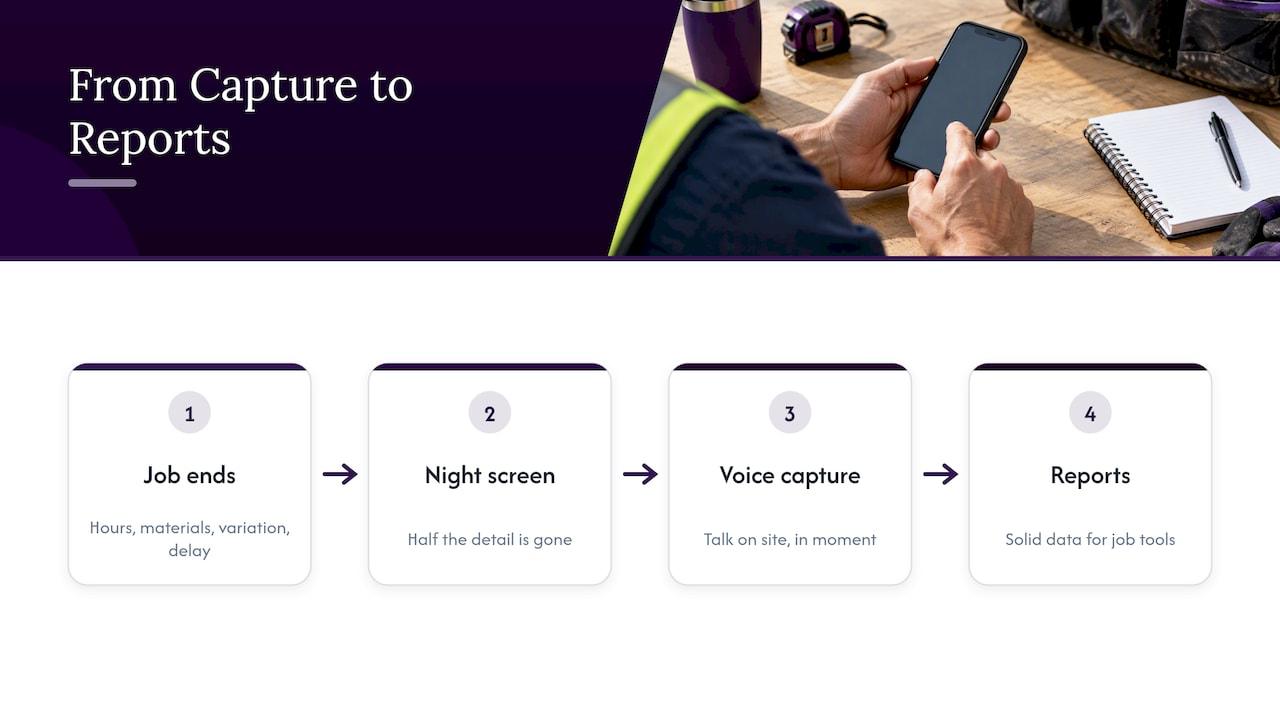
So we think about it the other way round. Make capture so easy that it happens on site, in the moment, by talking. Hayley is voice-first, which means you can say what happened rather than type it into forms. The detail lands where it should, and the reports you’ve set up in your job management tool have something solid to work with. Ask Hayley integrates with AroFlo and Xero, so it adds to your setup rather than asking you to start again.
Our honest advice: spend an hour on report design, then spend your real effort on the habits that feed the data. Reports won’t fix a messy process, but they will show you exactly where it’s messy.
— Hayley
Where Ask Hayley fits in
If your AroFlo reports are patchy because information doesn’t get recorded on the job, that’s the gap we close. Hayley answers calls you can’t, pre-qualifies leads before they reach your inbox, and handles admin through natural voice prompts. You can see how the quote-to-invoice side works in our hands-free quote to invoice workflow, or look at Xero invoice automation with voice-first intake if payment chasing is your biggest drain.
Ready to see it for yourself? Have a look at Ask Hayley and see how it could sit alongside what you already use.
Common setup mistakes to avoid
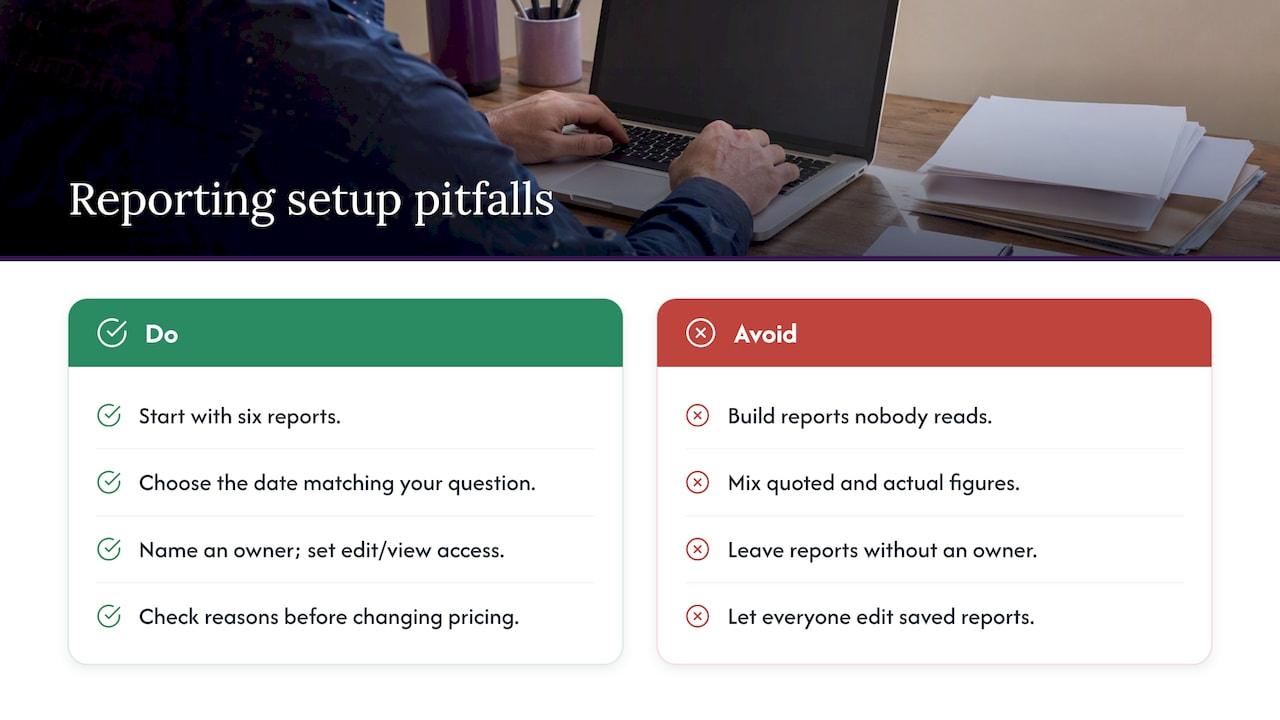
Building too many reports. Twenty saved reports means none get read. Start with six.
Filtering by the wrong date. Created date, completed date and invoice date tell different stories. Pick the one that matches your question.
Mixing quoted and actual figures. A margin calculated from a quote that was never updated after a variation is fiction.
No owner. If everyone can open the report, nobody does. Name a person.
Ignoring permissions. Staff who can edit saved reports can change what everyone else sees. Decide who edits and who only views.
Treating reports as a verdict. A low-margin job isn’t always a bad job. Check the reason before you change your pricing.
A 60-minute setup plan
If you want to do this in one sitting, here’s a realistic hour:
- Minutes 0 to 10: write down your five weekly questions.
- Minutes 10 to 30: build and save the overdue invoices and finished-not-invoiced reports.
- Minutes 30 to 45: build the open jobs report and check the statuses make sense.
- Minutes 45 to 55: build one profitability report and sense-check against a job you know.
- Minutes 55 to 60: book the weekly reporting slot in your calendar.
Then run it for a month. Adjust columns, drop what you don’t use, and add one new report only when a real question demands it.
FAQ
Can I save a custom report in AroFlo?
Yes. AroFlo’s documentation shows you customise a standard report, refresh it, then save it from the Save tab so you can reuse it. Name each one clearly so your team knows what it answers.
Which AroFlo reports should a small trade business set up first?
Start with overdue invoices, jobs finished but not invoiced, and open or stalled jobs. They deal with cash flow and workflow, which is where small businesses feel the pain first. Add profitability and utilisation once your time and materials entries are reliable.
Why do my AroFlo reports look wrong?
Usually the filters or the underlying data are at fault, not the report. Check your date range, then look for missing timesheet entries, unrecorded materials and inconsistent job statuses. Compare one report total against something you already trust, such as a bank deposit total.
Can AroFlo reports feed into Xero or other accounting software?
One Australian guide says AroFlo’s help pages describe CSV-based data links to Xero, MYOB, QuickBooks and Reckon for financial records. Confirm the current options with AroFlo and your bookkeeper before you rely on them for BAS.


