


A voice-first spam call assistant answers calls hands-free, filters out spam and scam callers, and pre-qualifies genuine leads so you lose fewer jobs to missed calls. It runs on your existing business number, needs no extra app, and gives you a quick summary instead of a voicemail you’ll never check. We built Ask Hayley around exactly this problem, with privacy handled in line with OAIC guidance.
TL;DR:
- Voice assistants effectively filter out spam and scam callers, ensuring genuine leads are prioritized and responded to within minutes via SMS summaries.
- Custom question flows and adjustable spam scoring are essential for maintaining accuracy and reducing false positives in call screening.
- Fast notification times and integration with scheduling or billing tools are key features that directly impact the likelihood of securing jobs.
- Privacy compliance requires understanding data retention, access controls, and clear disclosure of how caller information is used and stored.
- Most tradies can set up and tune a voice-first call screening system within a week, with ongoing review of call summaries to optimize performance.
Table of Contents
- How voice-first call-screening assistants actually work for tradies
- Key features to prioritise when evaluating a voice-first spam call service
- Privacy, data handling and compliance checks under OAIC guidance
- Step-by-step setup and on-site best practice for tradies
- Why voice-first call screening fits the way tradies actually work
- A voice-first option built for Australian trade businesses
- FAQ
- Sources
How voice-first call-screening assistants actually work for tradies
When a call comes in, a voice assistant like ours picks up with a short greeting and asks a handful of qualifying questions on the spot: what’s the job, where’s the site, how soon do you need someone out. No typing, no app, no screen to glance at while you’re up a ladder.
Behind that simple exchange, the system is reading caller signals in real time with insights from the Wattle blog on AI voice agent capabilities. Known spam patterns, suspicious number formats and repeat nuisance callers get flagged and pushed to the bottom of the pile or ignored outright, while a real customer asking about a blocked drain moves straight through to you.
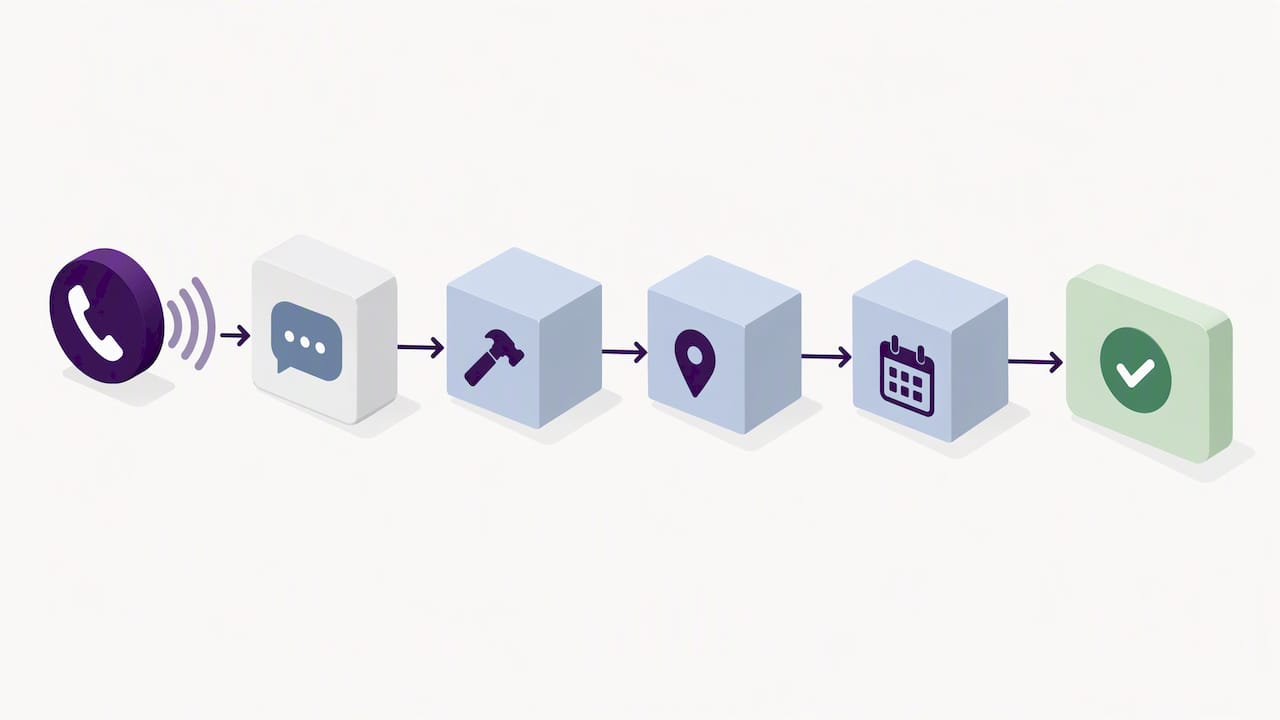
The flow generally looks like this:
- A greeting and two or three qualifying questions capture the job type, location and urgency.
- Spam and scam signals, including known robocall patterns and caller behaviour; get filtered automatically.
- Calls that need a human get flagged for hand-off, with a transcript or summary sent straight to your phone.
- An SMS lands within minutes so you can call back a hot lead before someone else does.
This matters because trade work doesn’t happen at a desk. You’re on a roof, under a vehicle or driving between jobs, and a missed call often means a missed job. A voice-first assistant trades the old voicemail guessing game for a short text that tells you exactly what the caller wanted and whether they’re worth calling back now.
Pro Tip: Keep your qualifying questions to three or fewer. Longer scripts cause callers to hang up before the assistant finishes.
Key features to prioritise when evaluating a voice-first spam call service
Not every voice assistant is built the same way, and some add more friction than they remove. When you’re comparing options, focus on the things that actually change your day-to-day call handling.
- Voice recognition reliability: the assistant needs to understand tradie accents, trade terminology and noisy background conditions without constant misfires.
- Custom question flows: you should be able to set your own qualifying questions per job type, not rely on a generic script built for retail.
- Spam screening and caller scoring: look for the ability to set your own ignore rules and adjust thresholds as you learn which callers are genuine.
- Fast notifications: an SMS summary should land within minutes, not hours, because lead response speed is often the difference between winning and losing the job.
- Integration options: calendar sync, SMS reminders and connections to tools like Xero or AroFlo save you from re-entering the same job details twice.
- Plan shape and trial period: a straightforward subscription with optional add-ons, plus a short trial, lets you test the fit before committing.
Response speed deserves particular attention. A tracing and monitoring case study from hipages showed that fixing delivery bottlenecks lifted end-to-end lead delivery success from 93% to over 99%, a clear reminder that even small delays in getting a lead to the right person cost real jobs. The same logic applies to call screening: an assistant that takes too long to flag a hot lead is barely better than a missed call.
Privacy, data handling and compliance checks under OAIC guidance
Handing customer calls to an AI assistant means handling personal information, and the Australian Privacy Principles apply the moment a caller’s details are collected, stored or used to generate a transcript. A few principles matter most here: APP 3 covers what you’re allowed to collect, APP 5 requires you to tell callers how their information will be used, APP 6 limits how that information can be used or disclosed beyond its original purpose, APP 10 requires accuracy, and APP 11 requires you to keep it secure.
OAIC guidance recommends organisations understand an AI product’s training data, test it for accuracy, and take active steps to protect personal information under APPs including APP 6, APP 10 and APP 11. That means asking your provider directly whether call audio or transcripts are accessible to anyone outside your business, and for how long records are kept.
Before you commit to any provider, check for:
- Clear limits on who can access call recordings or transcripts.
- The ability to disable or restrict features that capture sensitive information.
- Defined data retention periods rather than indefinite storage.
- An audit log you can review if a privacy question comes up.
On the operational side, give your staff a short briefing on what the assistant can and can’t do, run a periodic check on transcript accuracy, and treat privacy as an ongoing routine rather than a box ticked once at setup.
Step-by-step setup and on-site best practice for tradies
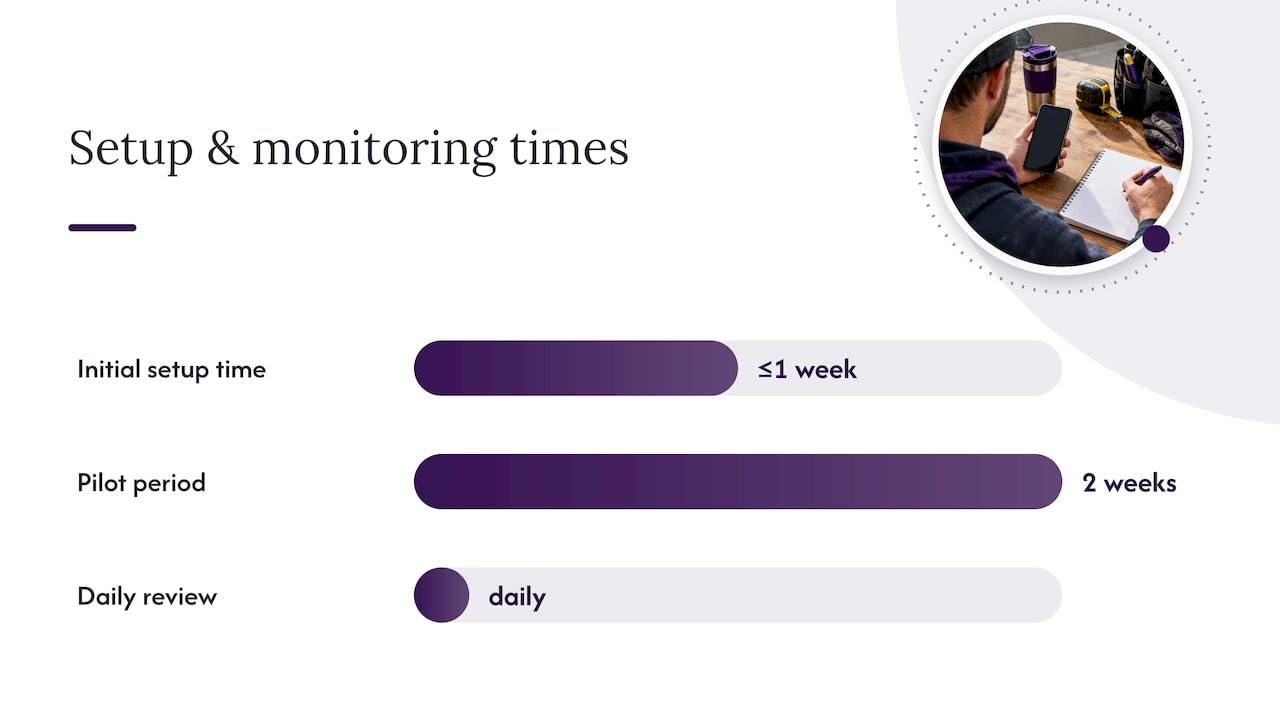
Getting a voice-first assistant working well takes a bit of setup, but most tradies are fully running within a week.
- Prepare the basics first: confirm which phone number the assistant will answer, write out your greeting, and list the three or four qualifying questions that matter most for your trade.
- Set up SMS templates: draft a short confirmation message and a reminder template so customers get a consistent follow-up after every call.
- Run a two-week pilot: let the assistant handle live calls, then review the summaries for misclassified spam or awkward question flows.
- Tune the thresholds: adjust spam-scoring rules and question wording based on what the pilot shows, because real callers rarely match a script perfectly.
- Set working hours and automation: enable SMS appointment reminders and a clear cancellation policy so customers know what to expect.
- Review daily: a quick scan of call summaries each evening keeps you on top of hot leads and catches problems early.
Pro Tip: During the pilot, flag every call the assistant got wrong, whether it missed a genuine lead or let a scam call through. Patterns show up fast once you’re tracking them.
Signs it’s working: fewer voicemails piling up, quicker callbacks to hot leads, and customers commenting that someone always answers. Red flags to fix quickly include repeated false positives on genuine customers, callers complaining about being asked the same question twice, or any sign that personal details are being stored longer than you expected. Our missed-call recovery guide walks through more of these tuning signals in detail.
Why voice-first call screening fits the way tradies actually work
We built Ask Hayley around a simple observation: tradies don’t have a spare hand for an app, and they don’t have a spare ten minutes to check a dashboard between jobs. Voice is the one interface that works with your hands full and your ute door open.
The hipages delivery case study makes a point we see constantly in our own product work: speed of lead delivery decides who wins the job, far more than the quality of the quote that follows. A voice assistant that answers immediately and texts you the details promptly recovers leads that would otherwise go straight to a competitor’s voicemail.
— Hayley
A voice-first option built for Australian trade businesses
If you’re ready to stop losing jobs to missed calls, we’ve built this service specifically around that gap. It’s voice-first, designed for Australian tradies, and runs on core plans with optional add-ons for businesses wanting broader coverage.
- Answers and screens calls on-site without a separate app to learn.
- Pre-qualifies leads with your own custom questions before they hit your inbox.
- Scales from solo operators to small teams with the Office Manager plan and add-ons.
See how it fits your business on the Ask Hayley homepage.
FAQ
What does a voice-first spam call blocking service actually do?
It answers inbound calls on your behalf, asks a short set of qualifying questions, and filters out spam or scam callers before they reach you. Genuine leads get pre-qualified and summarised by SMS, so you spend your time calling back real customers instead of sorting through voicemail.
Is it legal to use AI call screening under Australian privacy law?
Yes, provided you handle caller information in line with the Australian Privacy Principles, including telling callers how their details are used and keeping access to recordings and transcripts limited. Check with your provider about data retention and who can access call audio before rolling it out.
Will spam filtering ever block a genuine customer by mistake?
Occasional false positives can happen with any screening system, which is why a short pilot period and adjustable scoring thresholds matter. Reviewing call summaries regularly during the first few weeks lets you tune the rules before they affect real jobs.
What plans does Ask Hayley offer for tradies?
We offer two core plans, Assistant and Office Manager, with optional add-ons including an AI Sales Agent and AI Website Chatbot for businesses wanting broader coverage. Pricing details are available directly through the Ask Hayley site.
How quickly should I expect notification of a new lead?
A fast SMS summary within minutes of the call is the standard to look for, since response speed often decides whether you or a competitor gets the job. The hipages case study showed that fixing delivery delays lifted lead success from 93% to over 99%, underlining how much timing matters.


