


Automated quoting means the repetitive parts of a quote happen without you: capturing the customer’s details, pulling in your rates, building the document, sending it and chasing it. You still make the pricing call. For a tradie on the tools all day, that is usually the difference between a quote out the same afternoon and one that sits in your head for three days while the customer rings someone else.
This guide covers what is worth automating, what must stay in your hands, the Australian rules that still apply when software writes the quote, and a workflow you can set up this week.
TL;DR
- Automate the admin around a quote (lead details, rate lookups, document layout, sending, follow-up). Keep scope judgement and final approval with you.
- A quote you send and the customer accepts is a legally binding contract, so every automated draft needs a human check before it goes out.
- Build your quote from real costs: labour, materials, travel, overheads and a margin. Software only repeats the numbers you give it.
- Get GST, expiry dates and payment terms into your templates once, so they appear correctly every time.
- Start small: one job type, one template, one follow-up message. Add more once it works.
Table of Contents
- What automated quoting actually means for a tradie
- What goes into a quote before you automate it
- A simple workflow for creating, sending and following up on quotes
- Australian rules that still apply when software writes the quote
- Where automated quoting goes wrong
- Privacy and connecting your existing tools
- Our perspective: voice first, because your hands are full
- Put it into practice
- A one-week setup plan
- FAQ
- Sources
What automated quoting actually means for a tradie
Most people hear “automated quoting” and picture software that looks at a job and spits out a price. That is not where the value is, and it is where the risk is.
The practical version automates the steps around the price:
- Capture. Someone calls or enquires, and the job details land somewhere structured: name, address, what they want done, photos, how urgent it is.
- Assemble. The draft pulls from your saved rates, your material list and a template for that job type.
- Review. You check scope, quantities and the total.
- Send. The quote goes out under your branding, with your terms and expiry date attached.
- Follow up. If there is no answer, a reminder goes out on a schedule you set.
- Convert. When the customer accepts, the job goes into your calendar and later becomes an invoice.
Steps 1, 2, 4, 5 and 6 are admin. Step 3 is your trade knowledge. Good automation takes the admin off you and leaves step 3 exactly where it belongs.
Why speed matters
We hear the same story from trade businesses: the work gets lost in the gap between the site visit and the quote. You are up a ladder or under a house, you tell yourself you will do it tonight, and by then you are tired and the quote becomes tomorrow’s job. Meanwhile the customer has asked two other businesses. Faster quoting is not about being flashy. It is about being the first reasonable price in front of someone who wants the job done.
What goes into a quote before you automate it
Automation multiplies whatever you feed it. If your rates are too low, you will now underprice jobs faster and more consistently. So the first job is to get the inputs right.
The official small business guidance recommends pricing for profit by including all your costs and a fair margin, rather than quoting low just to win work. In practice, a quote should cover:
- Labour. Your time and any staff or subcontractors, at a charge-out rate that covers wages, super, leave, insurance and non-billable hours. If you have not worked this out properly, start with our guide to using real job time to calculate charge-out rates.
- Materials. Quantities, current supplier prices and a sensible allowance for waste and returns.
- Travel and callout. Time on the road and fuel are real costs, especially across a wide service area.
- Overheads. Vehicle, tools, software, licences and insurance.
- Margin. The part that keeps the business alive when a job runs over.
We break these down in 5 costs Australian tradies must include in every quote. If you are unsure whether your numbers hold up, a job profitability analysis of your last ten jobs will show you where money leaks.
Build rate cards and templates
Once your costs are clear, save them as reusable pieces:
- A rate card with your hourly charge-out rate, callout fee and after-hours loading.
- A materials list for the items you use most, with prices you update regularly.
- A job template for each common job type (for example a hot water swap, a switchboard upgrade, a tree removal with a standard crew), with standard scope wording and exclusions.
This is the engine behind any automated quote. The cleaner these are, the less you edit each draft.
A simple workflow for creating, sending and following up on quotes
Here is a workflow that suits a one-to-ten person business. You do not need to build all of it at once.
Step 1: Capture the enquiry properly
Most bad quotes start with a vague enquiry. “Need a quote for a fence” tells you nothing. Decide the five or six facts you always need before pricing: address, what the job is, rough size, access, timing and photos. Put them in one place every time, whether it comes from a phone call, a text or your website.
This is also where missed calls hurt. If you cannot answer on site, the lead goes to the next business on the list. That is why we built Hayley to answer inbound calls and pre-qualify the caller before the enquiry reaches your inbox.
Step 2: Pick the right template
Match the enquiry to a job template. If it does not fit one, that is a signal it needs a site visit, not a quick quote.
Step 3: Draft, then review
Let the system fill in rates, quantities and standard wording. Then read the draft like a customer and like an estimator. Use a short checklist:
- Is it the right customer and the right site address?
- Does every scope item match what was agreed?
- Are quantities and dimensions right?
- Who supplies which materials?
- Are the unknowns written down (hidden damage, access, existing conditions)?
- Are the rates current?
- Do the subtotal, GST and total add up?
- Are the validity period and payment terms there?
Approve the exact version you are about to send, not an earlier draft.
Step 4: Send with terms attached
A quote with no terms invites arguments. Your deposit, variation process, expiry date and payment terms should travel with every quote. Our page on quote terms that protect your price and deposits covers the wording tradies usually need.
Step 5: Follow up on a schedule
Most customers who go quiet have not said no. They are busy, comparing, or forgot. A short, polite message a couple of days after sending, and another a few days later, wins back work you would otherwise lose. We lay out a cadence in our quote follow-up guide. Keep each message short and human, and stop when the customer says no.
Step 6: Set an expiry and stick to it
Material prices move and your diary fills up. A quote that never expires is a free option for the customer. A 30-day window is a common starting point, and our quote expiry policy explains how to protect your margin without sounding pushy.
Step 7: Move accepted quotes straight through
When a customer accepts, the quote should become a booked job and later an invoice, with nothing retyped. Retyping is where errors creep in and where evenings disappear. See our hands-free quote to invoice workflow for how this looks in practice.
Australian rules that still apply when software writes the quote
Automation does not change your legal obligations. Three points matter most.
A quote can become a contract
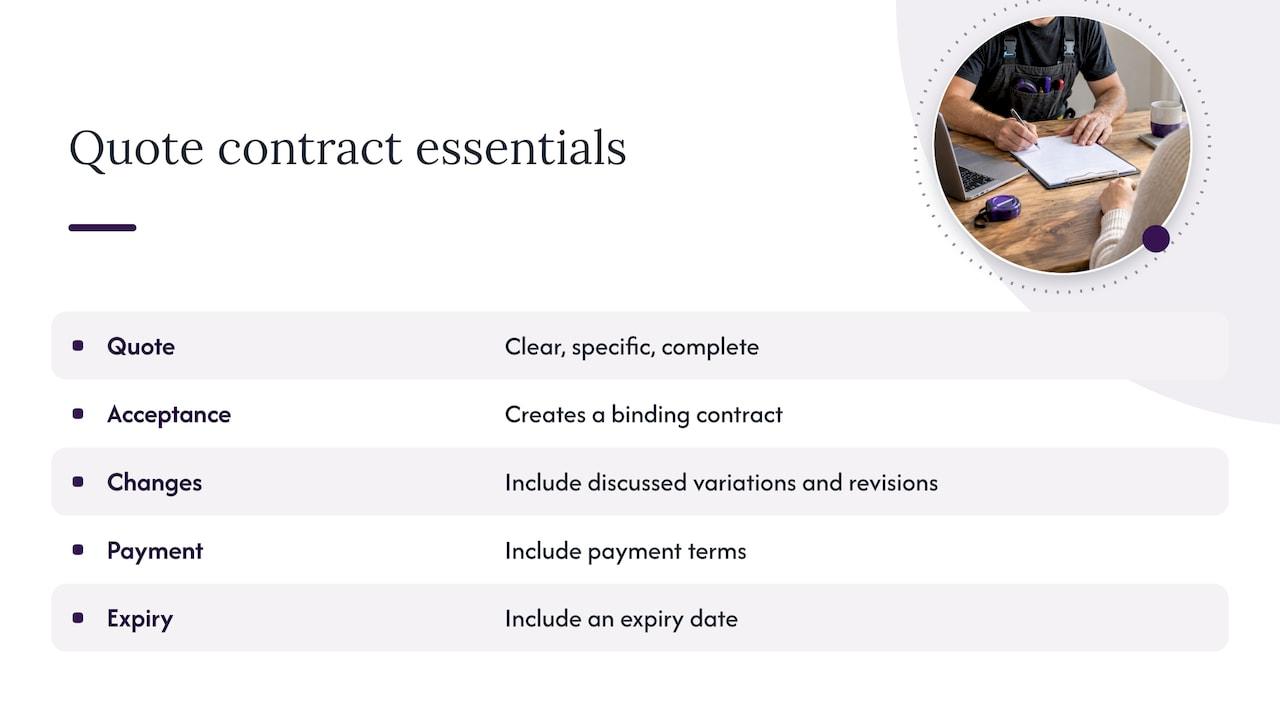
Business.gov.au says a written quote should be clear, specific and complete, and that accepting it makes it a legally binding contract. It also recommends including any variations and revisions discussed, payment terms and an expiry date. If your template is vague, your automated quotes will all be vague in the same way.
Vague scope is the usual cause of disputes. Writing exclusions and fixed-scope descriptions clearly protects both sides. A good example from another trade is this breakdown of fixed scope quotes for network cabling, which shows how spelling out what is and is not included keeps a price meaningful.
GST
GST is 10% on most goods and services, and a business must register when its GST turnover reaches $75,000 or more, though smaller businesses can register voluntarily. If you are registered, most of your sales are taxable, and the ATO explains that GST is included in the price and reported through your activity statement.
Set your templates to show GST clearly, either as a separate line or as a GST-inclusive total, so the customer never sees a surprise. If you are unsure how your business is treated, ask your accountant or bookkeeper.
Tax invoices after the job
A quote is not a tax invoice. When the job is done, your invoice needs to meet ATO rules. For taxable sales under $1,000, the ATO sets out the information required, including your identity and ABN, the issue date, a description of what was sold, the quantity and price, and the GST amount or a statement that GST is included. If a customer asks for a tax invoice, you generally have 28 days to provide it, except for sales of $82.50 or less including GST.
The point of connecting quoting to invoicing is that the details you entered once flow through, instead of being retyped under time pressure.
Where automated quoting goes wrong
Be honest about the limits. Automation works best when jobs are repeatable and the facts are known. It struggles when:
- The job has hidden unknowns. Rotten framing behind a wall, old wiring, soil conditions, a roof that looks fine from the ground.
- Access is restricted. A narrow side path, a steep block or a tight roof space changes labour dramatically.
- The work is outside your normal offer. A one-off job that does not fit any template.
- Information is missing or conflicting. The customer says two different things, or the photos do not match the description.
In these cases, the right output from the system is a question or a flag, not a guess. If you use any tool that drafts quotes, test it on your awkward past jobs, not your easy ones. See whether it flags the unknowns or quietly assumes them. Keep first drafts in draft status until you approve them. Provisional allowances and clear exclusions are your friends here: say what is included, what is an estimate, and how extra costs will be handled.
A useful rule: if you would not price it from a photo and a phone call without a site visit, do not let software do it either.
Privacy and connecting your existing tools
Most tradies already have accounting software and perhaps a job management tool. Before you plug quoting into them, ask a few practical questions:
- Does it connect to what you already use? Re-entering quotes into your accounting package defeats the purpose. Ask Hayley integrates with Xero and AroFlo, for example.
- Where does customer information go? Names, phone numbers and addresses are personal information. The Office of the Australian Information Commissioner says privacy obligations apply to personal information entered into an AI system and to output that contains personal information. It advises businesses to do due diligence on the product, keep human oversight, check access and security, and update privacy notices.
- What are your staff pasting into public tools? The OAIC also recommends policies on AI use, limits on personal information uploaded to public tools, sensible privacy settings and staff training.
For a small business, that translates to a short list: use a tool built for business use, keep customer details out of free public chatbots, tell customers how you handle their information, and make sure a person approves what goes out.
Our perspective: voice first, because your hands are full
We built Ask Hayley around a simple observation: tradies do not quote at a desk. You are on site, covered in dust, with a phone you can barely hold. Forms and dashboards assume you have a spare twenty minutes and a clean keyboard. You do not.
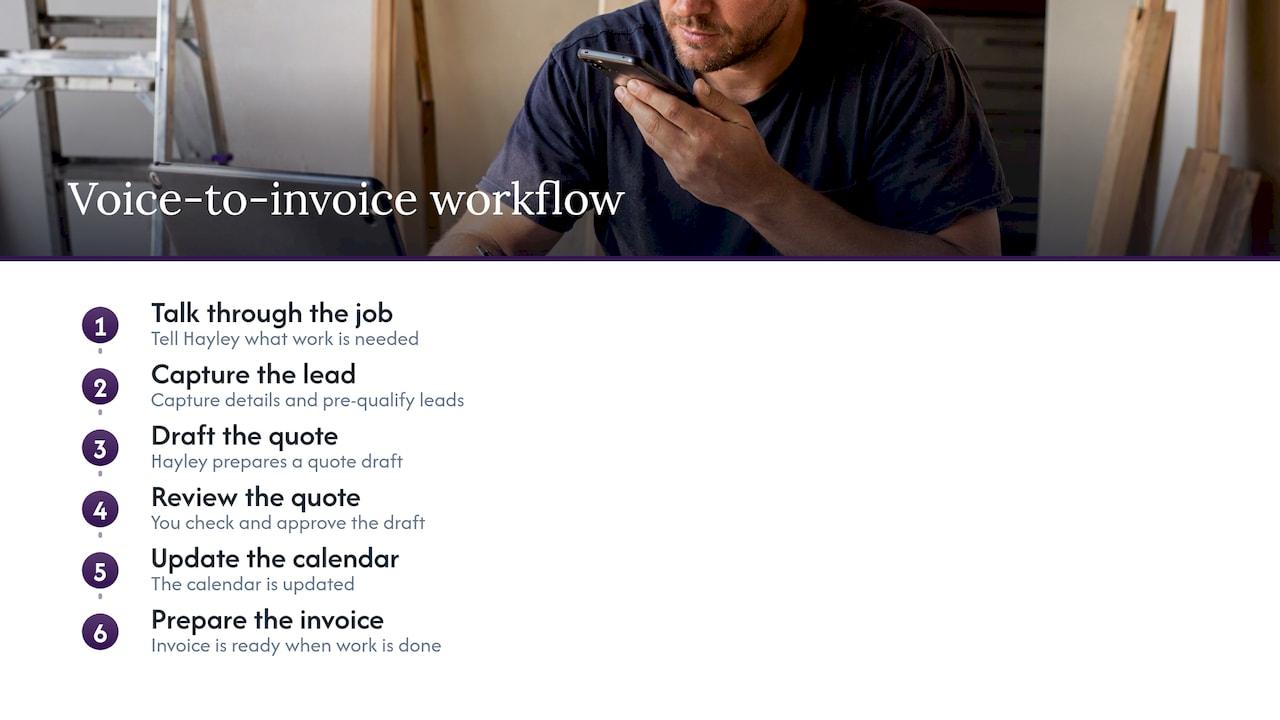
So we start with talking. You tell Hayley about the job, and the admin follows: lead details captured, the quote drafted, the calendar updated, the invoice ready when the work is done. Hayley also answers calls you cannot, and pre-qualifies leads so that what reaches you is worth a quote.
What we do not believe in is removing you from the decision. A quote carries your name, your margin and a legal commitment. Software should get you to a solid draft quickly, then hand it back to you. Automation that skips the human check does not save time. It moves the cost to the end of the job, when it is much harder to fix.
If you take one thing from this guide, make it this: fix your numbers first, then automate the paperwork around them.
— Hayley
Put it into practice
If you want the quoting, call answering and invoicing handled in one place, without learning another app, take a look at Ask Hayley. It is built for Australian tradies and small service businesses, and plugs into Xero and AroFlo. We also help with the professional side: a one page website, tender preparation, and safety and compliance documentation, for when you want to win bigger or more regular work.
A one-week setup plan
You do not need a big project. Try this:
- Day 1: Work out your true charge-out rate and callout fee.
- Day 2: List your five most common job types and write standard scope and exclusions for each.
- Day 3: Add your quote terms: deposit, variations, expiry, payment terms and GST wording.
- Day 4: Set up your follow-up messages.
- Day 5: Test with three real past jobs, including one awkward one. Check the totals by hand.
- Weekend: Run your next live quote through the new process and note what you had to change.
After a month, look at how many quotes went out within 24 hours and how many were accepted. That is your measure of whether it works.
FAQ
Can software price a job for me?
It can calculate a price from your rates, material costs and templates, which is useful for repeatable work. It cannot judge what it cannot see, such as hidden damage or difficult access. Treat the output as a draft that you review and approve, especially for anything unusual.
Is an automated quote legally binding?
The method of creating it does not matter. Business.gov.au says that accepting a written quote makes it a legally binding contract, so the quote you send is the one you are held to. Check the scope, the total, the expiry date and your terms before it goes out.
Do I need to show GST on my quotes?
If you are registered for GST, your quote should make clear whether the price includes GST, and your later tax invoice must meet ATO requirements. Registration is required once your GST turnover reaches $75,000. If you are unsure of your position, speak to your accountant.
How soon should I follow up a quote?
A short message within a couple of days is a sensible start, then one more a few days later. Keep it polite and easy to reply to, and stop once the customer declines. Our follow-up cadence page has examples you can adapt.
What should I automate first?
Start with the step that costs you the most time, which for most tradies is getting the quote out on the day of the site visit. One template for one common job type is enough. Add follow-ups and invoicing once that is running smoothly.
Sources
- Prepare quotes | business.gov.au
- Register for goods and services tax (GST) | business.gov.au
- Taxable sales | Australian Taxation Office
- Tax invoices | Australian Taxation Office
- Guidance on privacy and the use of commercially available AI products | OAIC
- GenAI tools in the workplace | OAIC
- Network cabling costs and fixed scope quotes in Australia


